You are scrolling through your social media feed when an ad catches your eye. You click the link, and it takes you to www.trustname.com But wait is what you just saw a website or a domain? While these two terms are frequently used interchangeably in casual conversation, they serve completely different functions.
Put simply, a domain is the digital address people use to find your business online, whereas a website is the actual collection of pages, text, images, and interactive content that visitors engage with once they arrive. Understanding this distinction is the first step toward building a successful online presence.
This article demystifies what constitutes a domain and a website, highlights their key architectural differences, and explains how they collaborate to create the digital experiences we interact with daily.
Key Takeaways
- The Structural Divide – A domain is your internet address (the street sign) a website is the content and code (the house) web hosting is the server space where your files live (the plot of land).
- The Role of DNS – The Domain Name System (DNS) acts as the internet's phone book, translating human readable domain names into computer readable numerical IP addresses.
- Brand Protectio – Registering multiple Top Level Domain (TLD) variations (like .com, .net, and .org) prevents competitors from hijacking your traffic or confusing your audience.
- Hosting is Essential – A registered domain name will lead to an error page unless it is pointed to a reliable web hosting server where your website's files are securely stored.
TABLE OF CONTENTS
- Key Takeaways
- What Is a Domain?
- What Is a Website?
- How Do Websites and Domains Work Together?
- Choosing a Web Hosting Provider
- Frequently Asked Questions (FAQs)
- Conclusion
What Is A Domain?
A domain name is the specific address that people type into their web browsers to visit a website. Just as a physical street address helps people locate a brick and mortar building, a domain name directs users to the exact destination on the internet.
The primary purpose of a domain is to provide a human readable pathway to access online content. Computers communicate using complex numerical strings known as IP (Internet Protocol) addresses.
Because remembering long strings of numbers for every site you want to visit is highly impractical, domains translate those numbers into intuitive, memorable words. Domains are critical to your online strategy for several foundational reasons
- Branding
A strong, well chosen domain name reinforces your brand identity and makes you instantly recognizable.
- Credibility
Owning a professional domain lends immediate legitimacy and authority to your online presence.
- SEO (Search Engine Optimization)
Your domain choice can positively impact your search engine rankings, especially when it features relevant keywords naturally.
- Types Of Domains
A standard domain name is divided into distinct hierarchical layers, each playing a specific role in internet routing.[+] [List] Green Unordered - Top-Level Domains (TLDs)
This is the highest level of the domain name hierarchy, representing the extension at the absolute end of a web address, such as .com, .org, or .net. This category also includes country code top level domains (ccTLDs) like .uk for the United Kingdom or .ca for Canada.
- Second-Level Domains (SLDs)
This is the core, custom part of the domain name that directly precedes the TLD.
Ex – In the web address Trustname.com, "trustname" serves as the second level domain. - Subdomains
These appear before the second level domain and are used to isolate, organize, and manage distinct sections of a larger website.
Ex - A URL like blog.trustname.com uses "blog" as a dedicated subdomain specifically tailored to host a company blog.
Different TLDs are historically associated with distinct operational purposes. For instance, .com is globally favored for commercial operations, whereas .org is traditionally reserved for non profit organizations.
In recent years, newer generic domain extensions like .tech, .shop, and .io have exploded in popularity among niche industries and technology startups looking for sharp, modern alternatives.
- Top-Level Domains (TLDs)
- How Domains Work
Domains function as the ultimate gateway between an everyday internet user and a web server. When someone enters a domain name into their browser's address bar, a global network known as the Domain Name System (DNS) goes to work.
The DNS quickly translates that alphabetical domain name into a machine readable IP address, instructing the browser exactly which server to contact to fetch the website's files.
- Buying And Registering A Domain
To acquire a domain name, you must secure it through an accredited domain registrar.
[+] [Callout] Info Insert title here [+] [Callout] Title/Title with Icon -> You do not own a domain name permanently. Instead, you lease or register the right to use it for a designated period, typically ranging from 1 to 10 years.
This global registration system is managed by registrars like Trustname, which are fully accredited by ICANN (the Internet Corporation for Assigned Names and Numbers) to sell and oversee domain data.
Before purchasing a domain name, ensure you evaluate the following essential criteria.
[+] [List] Green Unordered - Brand Relevance
Select a name that accurately mirrors your specific industry, identity, or content.
- Simplicity
Ensure it is effortless to spell and pronounce, making it inherently more memorable for direct traffic.
- Brevity
Shorter domain names are universally easier to type and significantly minimize user typos.
- Keyword Strategy
Integrate relevant industry keywords to aid your SEO visibility, but avoid forcing them awkwardly.
- Avoid Complexities
Steer completely clear of numbers and hyphens, as they consistently confuse users during manual searches.
The actual process of registering a domain is simple and straightforward.
It generally follows these steps.[+] [List] Green Ordered - Check Availability
Run a search on Trustname to verify your chosen name is available and ensure it does not infringe upon existing trademarks.
- Secure Variations
Purchase multiple TLD variations (such as .com, .net, and .org) simultaneously to protect your brand from copycats.
- Cart & Checkout
Add your selected extensions to your cart and proceed to the secure checkout interface.
- Provide Context
Enter your required administrative contact and billing details.
- Select Duration
Determine your preferred registration timeline (e.g., 1, 2, or 5 years).
- Complete Purchase
Finalize the payment transaction to officially secure your digital address.
Once your domain is successfully registered, ongoing management is required to keep it secure.
Best practices include.[+] [List] Green Unordered - Domain Locking
Enable the transfer lock setting to protect your domain against unauthorized or malicious transfers.
- WHOIS Privacy
Utilize privacy shields to mask your personal contact details from public databases, stopping spammers in their tracks.
- Information Upkeep
Keep your registrar contact records accurate and up to date to receive critical system alerts.
- Timely Renewals
Set up auto renewal to secure your domain before it expires and risks being purchased by a third party.
- Account Security
Enforce Two-Factor Authentication (2FA) or Multi-Factor Authentication (MFA) across your registrar accounts.
- DNS Mapping
Configure your nameservers and DNS records to accurately point to your web hosting provider.
- Email Customization
Establish professional email forwarding or custom branded email addresses (e.g., info@yourbrand.com).
- Brand Relevance
What Is A Website?
While a domain name is simply the address, a website is the actual destination. A website is a structured collection of interconnected web pages and related multimedia content identified by a shared domain name and published on at least one web server.
It is the tangible virtual space that users see, read, and interact with after their browser processes your web address.
- Components Of A Website
Every modern website relies on several core architectural elements to function correctly.
[+] [List] Green Unordered - Web Pages
Individual, distinct files that form the site, such as the homepage, about page, contact form, and individual blog entries.
- Media Assets
Images, video files, audio clips, and other interactive multimedia components designed to enrich the text.
- Core Content
The literal copywriting, informational graphics, and messaging presented to your visitors.
- Visual Design
The aesthetic layout, typography, color palettes, and stylistic choices that establish your user interface (UI).
- Technical Functionality
Back end utilities, including contact forms, Ecommerce shopping carts, internal search bars, and user login profiles.
- Web Pages
- How Websites Are Built
Websites are engineered using a mix of front end programming languages and specialized software platforms.
[+] [List] Green Unordered - HTML (Hypertext Markup Language)
The foundational skeleton code used to structure content on a web page.
- CSS (Cascading Style Sheets)
The stylistic code layer used to dictate layout, design, responsiveness, and visual presentation.
- JavaScript
The programming language responsible for creating dynamic features, animations, and real time user interactivity.
- Content Management Systems (CMS)
User friendly platforms such as WordPress, Wix, or Squarespace that empower individuals and businesses to build, edit, and scale websites without needing advanced coding skills.
- HTML (Hypertext Markup Language)
- Hosting Where Your Website Lives
Web hosting is the physical storage locker where your website's actual files, database, and media are kept. Hosting providers, such as Trustname or AWS, maintain specialized, high powered computers (servers) that remain connected to the internet 24/7, serving your site files to global users on demand.
[+] [Callout] Warning Insert title here [+] [Callout] Title/Title with Icon -> Without an active web hosting plan, your website cannot be seen by the public, even if you successfully registered a beautiful domain name.
Hosting services provide the vital infrastructure including storage space, cybersecurity firewalls, and data bandwidth required to keep your site fast, accessible, and operational around the clock.
Depending on your strategic goals, websites can take many forms.
[+] [List] Green Unordered - Personal Or Portfolio Sites
Spaces dedicated to showcasing an individual's professional work, creative projects, or resume.
- Business Sites
Informational platforms built to market specific corporate products, values, or offline services.
- Ecommerce Storefronts
Specialized transactional sites allowing users to safely browse inventory, add items to a cart, and buy goods online.
- Non Profit Or Educational Portals
Informational resource centers engineered to raise awareness, distribute assets, or gather community donations.
- Personal Or Portfolio Sites
- Types Of Web Hosting Services
When shopping for a hosting plan, you will generally choose from four primary server configurations.
Once a website is launched, continuous maintenance is required to preserve security and peak performanceHosting Type Ideal For Key Benefit Potential Drawback Shared Hosting Entry level blogs, small personal sites Highly affordable Shared resources can slow down during traffic spikes VPS Hosting Growing businesses, medium traffic Dedicated virtual resources Requires basic technical understanding Dedicated Hosting Enterprise sites, massive traffic Ultimate performance & control High monthly operational costs Cloud Hosting Scalable startups, unpredictable traffic Incredible reliability & uptime Pricing fluctuates based on exact resource usage [+] [List] Green Unordered - Regular Updates
Keep your underlying CMS core software, active plugins, and design themes current to patch vulnerabilities.
- Automated Backups
Implement regular schedules to back up your code and databases, allowing for instant recovery if an issue arises.
- Performance Monitoring
Use diagnostic tools to check loading speed, server response times, and overall site uptime.
- Content Audits
Periodically refresh your copy, fix broken hyperlinks, and update outdated information.
- Mobile Optimization
Ensure your web layout shifts fluidly across different devices, prioritizing a great mobile user experience.
- Malware Scanning
Routinely scan your server files to identify and eliminate security vulnerabilities or malware infections.
- Access Control
Strictly limit administrative login permissions to trusted personnel to minimize accidental data loss.
- Regular Updates
How Do Websites And Domains Work Together?
Websites and domains act as a team one cannot guide traffic without the other, and the other has nowhere to host visitors without the first.
- Connecting A Domain To A Website
The Process when a user decides to visit your digital space, a highly coordinated sequence occurs in milliseconds.
[+] [List] Green Ordered - The user inputs your custom domain name into their browser.
- The browser queries the global DNS registry to retrieve the unique numerical IP address of your hosting server.
- The browser sends a targeted request across the internet to that specific web host, asking for access to your site files.
- The hosting server approves the request and delivers the HTML, CSS, and media files back to the browser, which renders them into a beautiful, readable web page.
- One Domain, Multiple Websites
You can easily host multiple distinct websites or digital experiences under a single primary domain registry. This is accomplished using either subdomains or organized subdirectories.
[+] [List] Green Unordered - Using Subdomains
blog.trustname.com or shop.trustname.com (creates structurally separated areas).
- Using Subdirectories
[trustname.com/blog](https://trustname.com/blog) or [trustname.com/shop](https://trustname.com/shop) (keeps pages within the main site folder structure).
This architectural layout lets companies expand their web utilities while maintaining a single, unified brand identity across the web.
- Using Subdomains
- Multiple Domains, One Website
Conversely, you can route several different domain names to point directly to a single website destination. This multi domain approach is highly effective for.
[+] [List] Green Unordered - Brand Protection
Registering common typos or misspellings of your business name so lost users still find you.
- Traffic Capture
Purchasing alternative extensions (like .net or .org) and automatically redirecting them to your primary .com hub.
- Geographic Expansion
Using country specific TLDs (like .de or .fr) to seamlessly route users to localized, multilingual landing pages.
- Brand Protection
Choosing A Web Hosting Provider
Selecting your web hosting provider significantly influences your site's speed, search rankings, and security profile. Always evaluate these critical performance benchmarks before making a purchase.
- Uptime Guarantees
Uptime represents the literal percentage of time a hosting server stays active and accessible online. The baseline industry standard is 99.9%, which still permits a few minutes of unexpected downtime each month.
[+] [Callout] Info Insert title here [+] [Callout] Title/Title with Icon -> Trustname sets an elite benchmark by guaranteeing 100% website uptime all year round, ensuring your company never loses out on potential global sales.
- Customer Support Quality
When technical emergencies arise, having instant access to professional assistance is vital. Prioritize web hosts that supply 24/7 customer service across multiple communication channels, including live chat, phone support, and email ticketing.
Trustname features a highly responsive technical team backed by deep industry expertise to resolve infrastructure issues quickly and minimize corporate downtime.
- Scalability Options
As your monthly audience grows, your website will naturally demand more server storage, processing power, and bandwidth. A quality host provides straightforward, scalable pathways that let you upgrade your service tiers smoothly without disrupting current site visitors.
Ensure your host offers seamless data transitions when moving from standard shared setups up to virtual private servers or modern cloud networks.
- Security Features
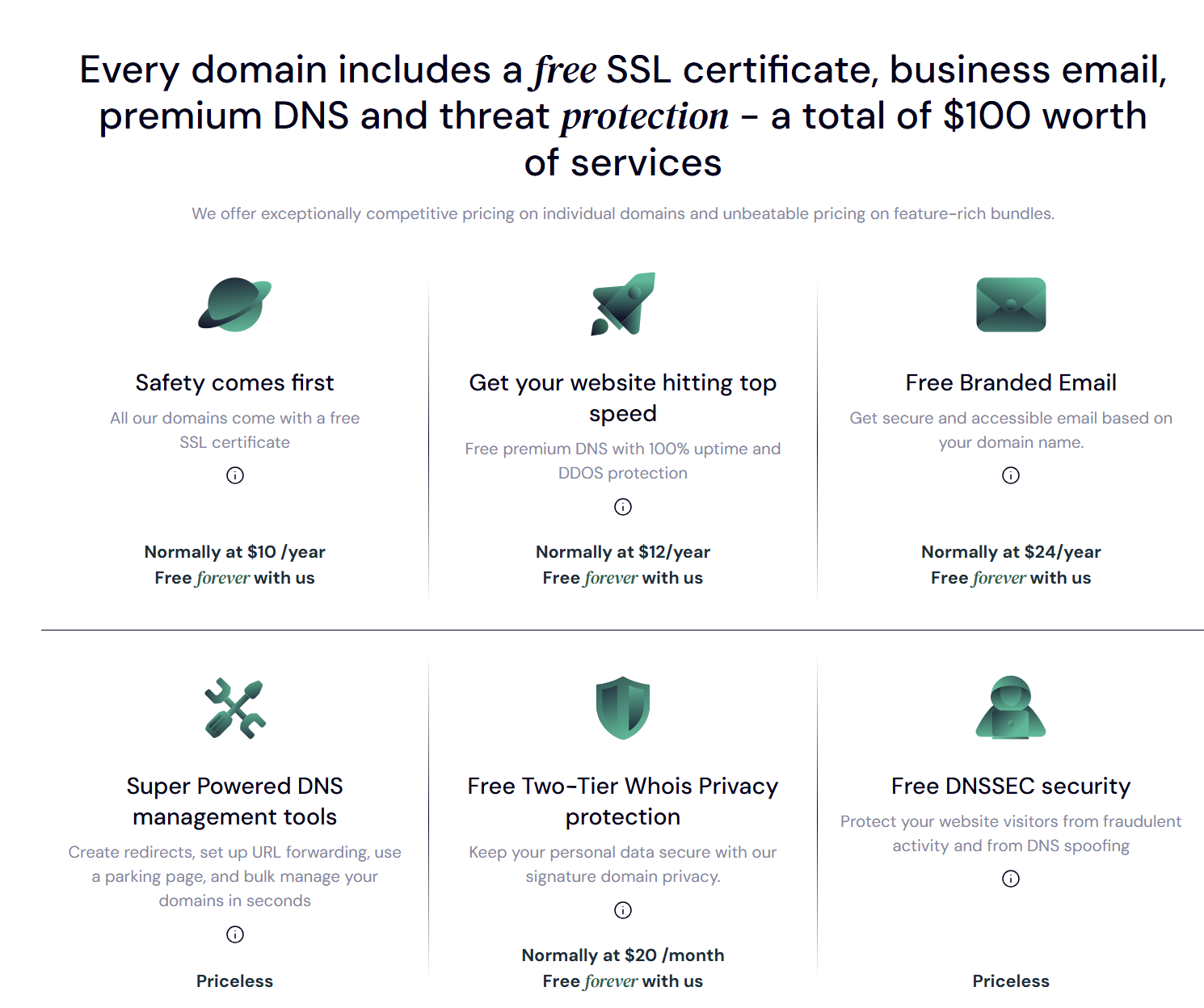
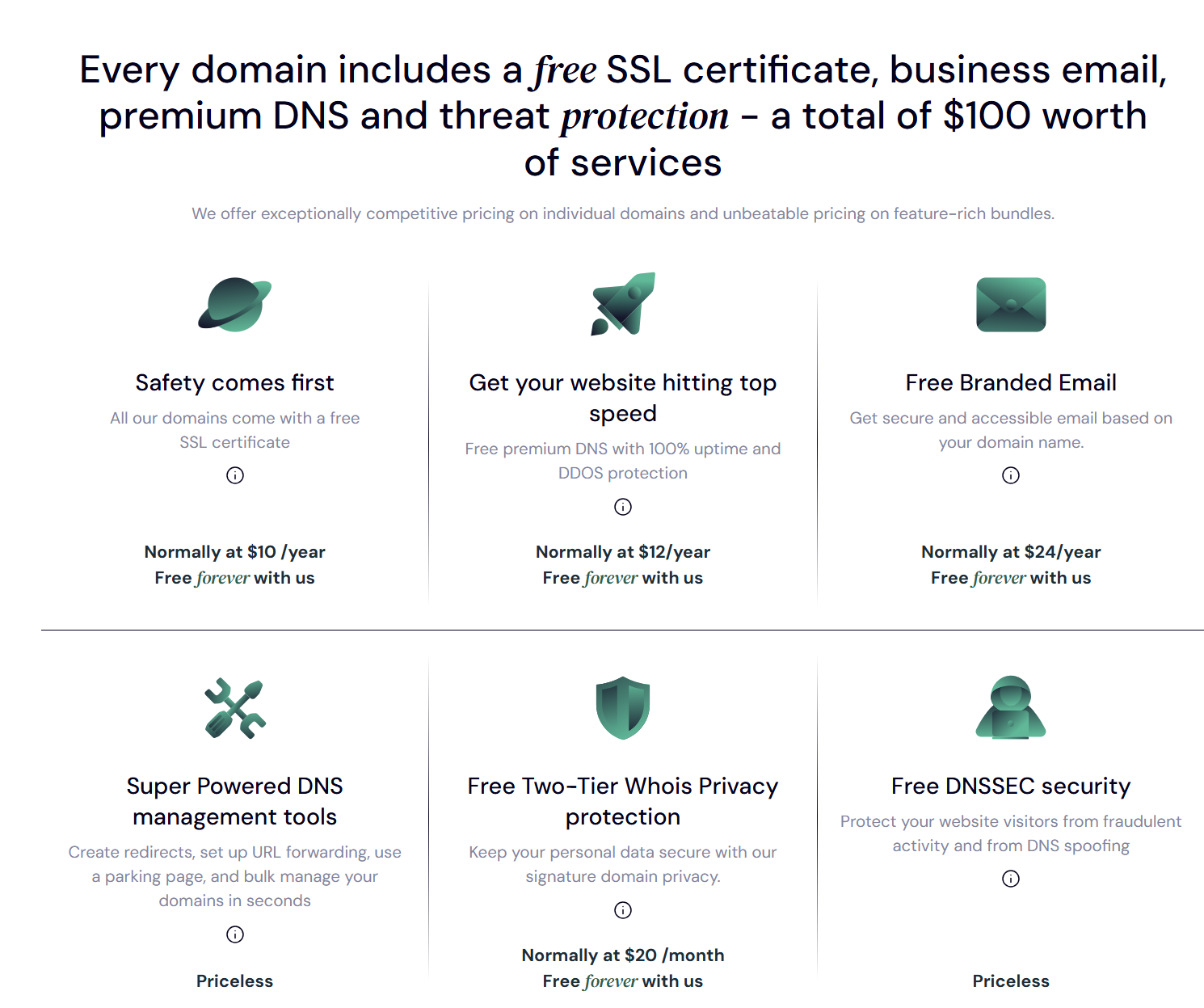
With cyber threats on the rise globally, comprehensive server side security is non negotiable. Look for hosting plans that come fully integrated with.
[+] [List] Green Unordered - SSL Certificates
To encrypt communication data traveling between your website and your user's devices.
- Firewall Management
To intercept, analyze, and block malicious traffic before it reaches your backend database.
- DDoS Protection
To neutralize Distributed Denial of Service attacks that attempt to crash your server by flooding it with fake traffic.
- Automated Patching
Regular, managed updates to server operating software to close newly discovered security vulnerabilities.
- SSL Certificates
- Backup Services
Frequent backups are your ultimate safety net against sudden data corruption, accidental admin deletions, or hacking attempts. Choose a provider that executes automated daily or weekly backups alongside a simple, single click data restoration tool.
- Price And Contract Terms
Web hosting fees fluctuate widely based on the underlying infrastructure you select. While shared hosting remains highly cost effective for beginners, advanced VPS, dedicated, or enterprise cloud plans require a higher monetary investment.
Always read the fine print regarding promotional introductory pricing. Many budget hosting providers offer incredibly low entry rates for the first year, only to increase costs significantly upon contract renewal. Review the structural terms carefully to avoid hidden administrative fees or locking yourself into multi year commitments that lack flexibility.
Frequently Asked Questions (FAQs)
Can I change my domain name after registering it?
No, you cannot edit or alter the spelling of a domain name once it is officially registered. However, you can easily register a brand new domain name and set up a permanent 301 redirect from your old address to the new one, ensuring you do not lose existing traffic.
Do I need both the "www" and "non www" versions of my domain?
It is highly recommended to secure both options. For consistency, you should configure one layout as your primary, official URL address and implement a server side redirect that automatically pushes the alternative version to it. This step protects your SEO profile by preventing duplicate content issues.
How often should I update my website?
You should refresh your web ecosystem regularly. Aim to add or optimize your consumer facing content at least once a month. Technical checkups such as testing backup systems, updating plugins, and analyzing security patches should occur weekly or biweekly.
Can I host my website myself?
While it is technically possible to turn a personal home computer into a web server, it is highly discouraged for standard businesses. Maintaining the required 24/7 power grids, fiber optic speeds, fire protection and cybersecurity protocols requires massive investments.
Trustname provides significantly better speed, data protection, and technical support at a fraction of the cost.
What's the difference between a domain registrar and a web host?
A domain registrar handles the registration, renewal, and ownership data of your digital web address. A web host provides the physical server space where your website files are stored. While these are separate functions, all in one companies like Trustname provide both services under a single dashboard for effortless management.
Conclusion
A domain name acts as your unique internet address, guiding traffic directly to your doorstep, while a website is the actual experience, content, and value your audience interacts with upon arrival. Together, they create a functional, reliable digital space for your business.
When establishing your brand online, investing in a robust hosting foundation that offers a 100% uptime guarantee, rock solid security protocols, automated file backups, and round the clock technical support is vital. Ready to launch? Build a solid, future proof home for your business with Trustname today!
Was this article helpful?
That’s Great!
Thank you for your feedback
Sorry! We couldn't be helpful
Thank you for your feedback
Feedback sent
We appreciate your effort and will try to fix the article