Transferring your domain to the right registrar can improve your domain management experience while giving you access to better security, transparent pricing, and reliable support. This guide explains the benefits of transferring your domain to Trustname and walks you through the transfer process step by step.
Key Takeaways
- Transparent Pricing – Enjoy clear pricing with no hidden fees or unexpected charges.
- Free Essentials – Get domain privacy, DNS, email, and other essential features included.
- Enhanced Security – Protect your domain with advanced privacy and security features.
- Easy Transfer – Follow a simple, step-by-step process to transfer your domain.
- Reliable Support – Receive expert human assistance whenever you need help.
TABLE OF CONTENTS
- Key Takeaways
- Here's Why You Should Move Your Domain to Trustname
- How to Initiate Your Domain Transfer at Trustname
- On Your Current Registrar
- On Trustname
If you are considering moving your domain to Trustname, we can't wait to have you! There are many registrars on the market today, but popular doesn't always mean best. If anything, most big registrars have evolved into profit-making houses that only want your money in exchange for the bare minimum features you can get.
From overpriced services to sketchy fees, poor support to hassle-ridden payments, and registrars who'd rather take down domains that have issues than carry out due diligence - it's wild out there.
At Trustname, we are committed to you as our customer and have designed our platform and services to give you all the tools to manage your domain names conveniently, as well as state of the art features you won't find on any other registrar.
We were the first domain owners and designed Trustname to cater to the needs of domain owners like you and fill the void of a truly customer-centric domain registrar that checks all the right boxes and won't leave you hanging when it matters. Ready to move your domain to Trustname? Let's show you all the perks you are about to start enjoying!
Here's Why You Should Move Your Domain To Trustname
- Affordable And Transparent Pricing
Trustname gives you some of the most affordable services on the market. We also take pride in how transparent our pricing is. First, we charge a base fee of $12.99 per year for the first year and $14.99 per year subsequently for the most popular TLD - .com.
We won't sneak in fees or add-ons to your cart just to make you pay more. What you see is what you get. Many registrars on the market today take free rein and push annoying upsells when you’re trying to purchase a domain and want to put a price tag on every single little feature.
What's more? Many of them have resorted to using clickbait prices, where extremely low prices are put on their services only for you to pay hundreds of times more subsequently.
[+] [Notice] Info Insert title here [+] [Notice] Title -> At Trustname, the initial price tag you see includes the cost of the service you are purchasing plus ICANN fees. The only extra fee you may ever get is taxes, and these will depend on the region.
Come to Trustname and save yourself the nightmare of unexpectedly high charges when your services are being renewed and the hassle of hounding the culprit registrars for refunds.
- All Your Domain Essentials Out Of The Box
If there's just one reason why you should move to Trustname, it'd be how much we believe in giving you the most value for money. Most registrars today will charge you for every single add-on to your domain, including domain essentials like Whois privacy, SSL certificates, email, DNS, etc.
At Trustname, you get all of these domain essentials out of the box without needing to pay extra. The only service we charge for subsequently is our SSL certificate suite. Everything else is free forever! Across most other registrars, this addon bundle will cost you $100 per year.
Move your domain to Trustname, and you'd have saved $500 in 5 years that you'd have spent on domain basics. All of these add-ons are bundled for free into the $14.99 renewal price.
For the first year, you can secure your website and signal trust through the free SSL certificate. You get access to our signature domain privacy that's leaps and bounds above what most other registrars offer. You get a free professional email that incorporates your domain.
[+] [Notice] Info Insert title here [+] [Notice] Title -> Finally, you also get access to our Premium DNS suite that gives you supercharged DNS management and access to DNSSEC. Come to Trustname and get everything you need to manage and secure your domain for free.
- The Best Domain Privacy On The Market
Building on our last point, Trustname offers a signature Two-Tier domain privacy package that you won't find with any other registrar. We are the only domain registrar that allows you to register domains truly anonymously and minimize your digital footprint.
[+] [Notice] Info Insert title here [+] [Notice] Title -> How does it work? On the first tier of Trustname's domain privacy, you can choose to register a domain in your own name or in the name of our partner proxy company, Perfect Privacy LLC, so that your name is never published in the public Whois database in the first place.
If you go with the latter, even though the domain has PP LLC listed as the registrant on paper, you retain full control of the domain.
On the second layer, we then give you the generic Whois data masking offered by most other registrars and hide your domain contact information - which could be yours or PP LLC's - so that any Whois lookup on your domain never shows your registrant information.
Our Two-Tier Whois privacy gives you the most privacy and allows you to own a domain without divulging your personal information!
- Truly Bulletproof Domain Protection
Trustname is the only truly bulletproof domain registrar if you run a 'grey area' business or a business in a sensitive niche. While we don't support obviously illegal content like child abuse, opioid sales, and websites that deal in arms or promote hate speech, we have built a platform to be a safe haven for abuse-prone businesses.
Many registrars these days are fond of taking down and suspending domains once they get abuse reports on them. No due diligence or investigations are carried out to confirm the validity of these reports.
At Trustname, we are all too familiar with how scammers and competitors orchestrate abuse reports against domains in order to pressure the registrars to take them down. Trustname sides with you when it matters.
As a registrar, we only facilitate domain registrations and management, and always take a neutral stance whenever we receive an abuse report on a domain or complaints about website content.
What's more? You'll be the first to know whenever your domain is involved in a dispute, so you have enough time to make any rectifications you may need to.
Our Multi-Jurisdictional Domain ShieldAside from hiding your domain information, our Two-Tier domain privacy also grants you a three-layer jurisdictional shield around your domain. First, Perfect Privacy LLC, the proxy partner we use to facilitate domain registrations, is based in St. Kitts and Nevis.
On the second layer, we provide you with generic Whois masking through our second security partner, Whois Privacy Protection Service LLC, based in the U.S.
And finally, Trustname is headquartered in Estonia. The implication of this?
Whenever anyone wants to gain access to information about your domain name, they'd need to submit three simultaneous court orders from these three regions where we and our partner security partners are headquartered!
- World Class Human Support
In a world where businesses keep trying to cut costs by incorporating Artificial Intelligence into every facet of their operations, the quality of customer support has taken a bad blow.
Many domain owners and webmasters complain about poor support from their registrars, with almost every query directed to chatbots that only give generic answers.
And most of the few registrars who still use human agents outsource their support to cheap agencies filled with people who have no real experience managing domains and will simply redirect you to knowledge base articles.
At Trustname, we pride ourselves on our team of human agents (many of whom are webmasters themselves). Move your domain to Trustname, and you are guaranteed world-class human support that's at your beck and call.
With decades of experience among our support reps, you'll be getting practical guidance and not just generic information.
And if you prefer to find answers yourself, we have a vast knowledge base and incredibly detailed support resources to help you troubleshoot and solve any domain issues swiftly.
- Convenient payments
It's bad enough that many registrars give you 'bare minimum' service, but what do we say about registrars who have glitchy payment systems that'll charge you only to reject the transaction later?
Many domain owners have lost their domains to expiration simply because their payments didn't go through on the registrar's side, even though their payment methods were funded.
Move your Trustname and enjoy the most seamless payments on the market. We accept payment via credit and bank cards, PayPal, third-party payment providers, and even cryptocurrencies!
Once you create your Trustname account, you get a built-in wallet you can fund to make your transactions even quicker and enjoy payments with $0 extra fees.
By accepting crypto payments, we give our customers the most anonymity to complement our Two-Tier Whois privacy, ensuring your contact information is never linked with the domain and that any interested parties can't 'trace the money'.
Crypto payments are also permissionless, meaning you won't experience any bank delays or verification processes typical of other traditional payment methods.
- Seamless User Interface
Many registrars feature clunky and dated dashboard designs that overcomplicate managing your domains and that are simply hard on the eyes. Most domain owners are not developers who are used to using dashboards that look like command lines.
Having to click several pages just to access your domain settings while navigating through bland layouts is a plight many domain owners face today. At Trustname, we value not just function, but also form.
Your domains should be easy to manage, and you should enjoy doing that. Our platform features a beautiful, user-focused dashboard that simplifies all your domain management with an aesthetic theme and intuitive buttons that anyone, even at first glance, can use to find all their domain settings quickly.
Click on the domain you want to manage, and all your core settings are right there after your second click. You can see your domain status and important dates, generate your Auth code, tweak your nameservers, set up auto-renew, enable DNSSEC, and manage your transfer settings on the same page.
How To Initiate Your Domain Transfer At Trustname
And with that, we know we have you sold! Ready to move your domain name to Trustname? Here are the steps you'd need to take:
On Your Current Registrar
Before you move your domain to Trustname, you'd need to prepare it at your current registrar. Here's what you need to do:
- Disable Whois Privacy
Domain privacy or Whois privacy is a basic service offered by most registrars to shield your domain contact information from the Whois database. Before transferring your domain to Trustname, you need to disable domain privacy on your current registrar.
Head to your domain settings and look for the transfer settings. Look for 'domain privacy', 'Whois privacy', 'Whois protection', or any other similar feature and disable it.
- Disable The Domain Lock
Next, you need to disable the domain lock. The domain lock is another basic security feature offered by most registrars to prevent unauthorized transfers or modifications to the domain.
On most registrars, you will also find the domain lock in the transfer settings. Disable it in your settings before initiating your transfer to Trustname. Don't worry, we will automatically enable the domain lock once your domain gets to Trustname.
- Generate The Auth (EPP) Code
And finally, you need to obtain the Auth or EPP code for your domain from your current registrar. The Auth code is a way for us to authenticate the transfer with your current registrar.
Once you generate it at your current registrar, you will submit it to Trustname, and we will use it to prove to your registrar that you initiated the transfer. Your domain Auth code should also be in your transfer settings. Your registrar may give you the code directly in your dashboard or send it via email.
Copy it and save it for later.
On Trustname
To start moving your domain to Trustname, follow these steps:
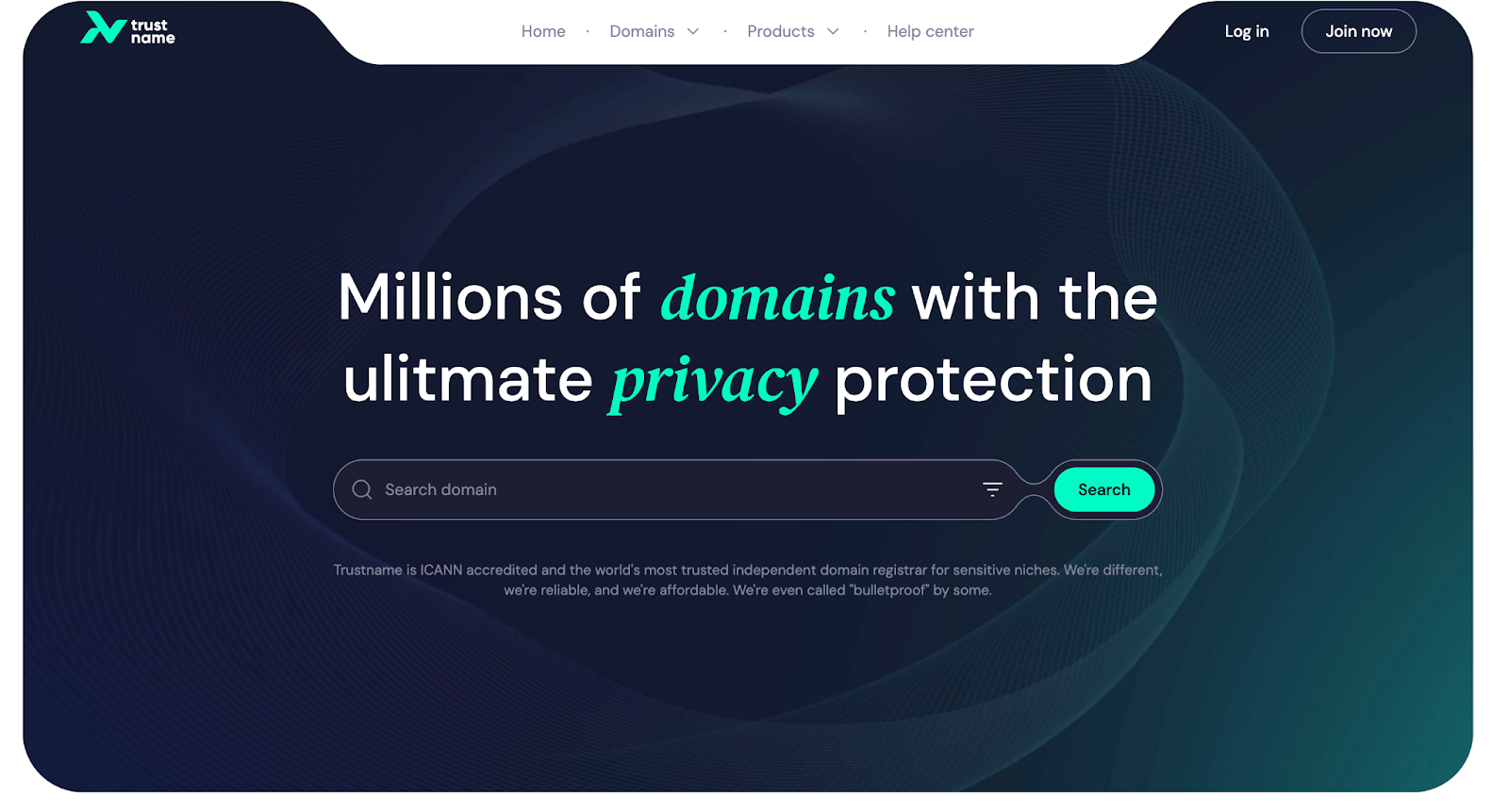
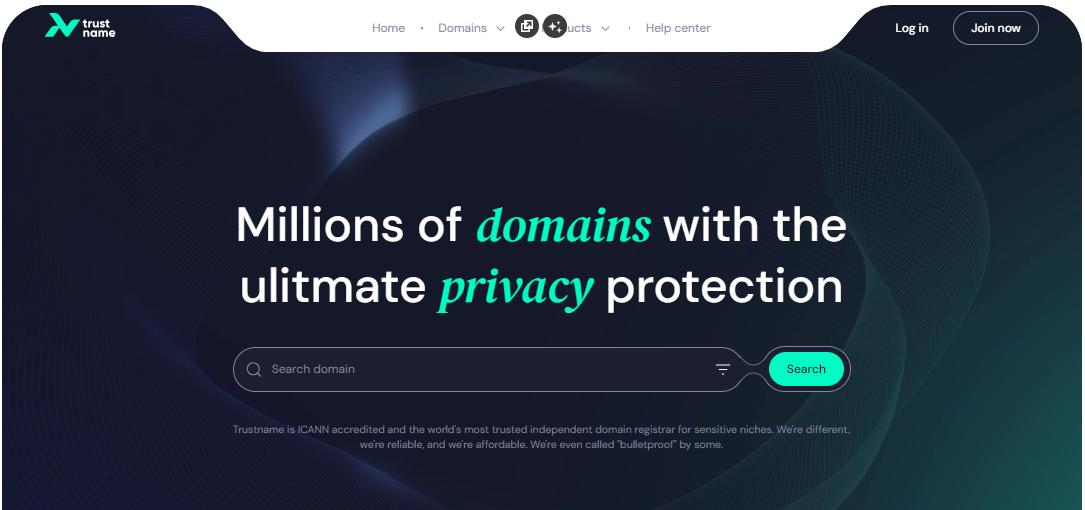
- Head to the Trustname.com website and click 'Log In' at the top right corner to access your Trustname account.
- Fill in your account username and password to gain access to your customer portal.
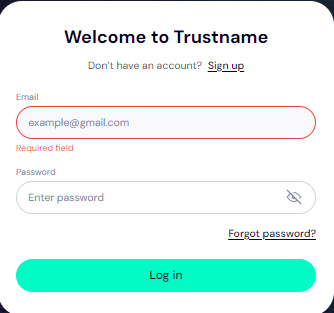
Click 'Log in'. - To access your domain transfer settings, under the 'Domains' dropdown in the header, click on 'Transfer'.
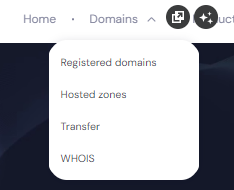
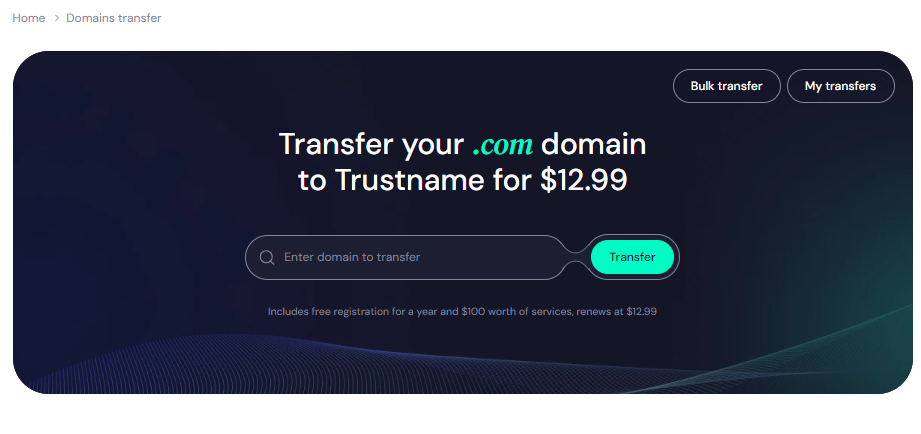
- In the Trustname domain transfer portal, type in your domain you want to transfer, including the top-level domain (domain extension), and click on the 'Transfer' button.
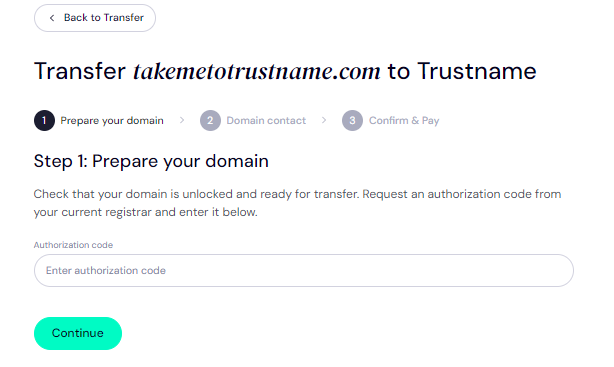
Give Us The Auth Code (EPP)
Next, copy and paste in the Auth Code (EPP code) you copied from your current registrar's portal earlier or from your email and click on 'Continue'.
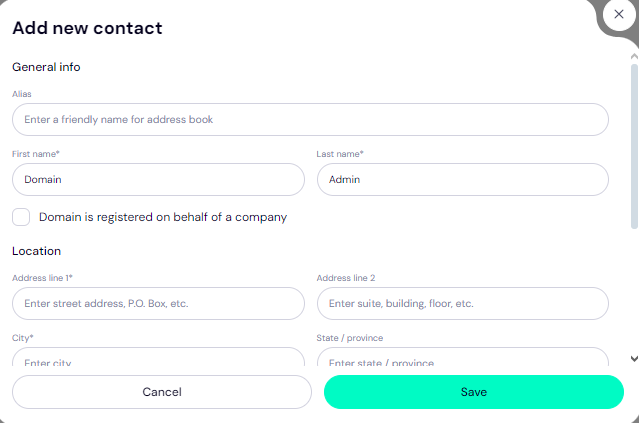
Enter Domain Contact
On the next page, specify your domain contact details. You can choose to use your own details by clicking on the 'Choose contact' dropdown and selecting 'Add new contact'.
Or you can enjoy the highest possible privacy by choosing 'Use a pre-defined contact' to enable Trustname's Two-Tier Privacy Protection. With the second option, your domain contact info will be:
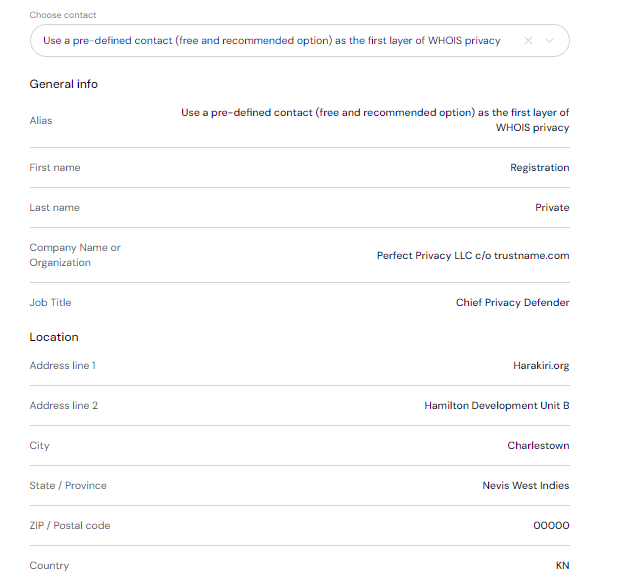
Remember, if you choose our pre-defined contact, you won't need to verify any details since this information is verified and your domain can move more quickly.
After filling in your domain contact details, click on 'Continue'.
Pay For An Extended Registration
On the next page, pay for your domain transfer and get 1 extra year added to your domain's current expiry date.
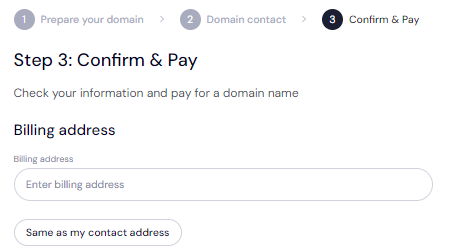
- Enter your billing address. You can also select 'Same as my contact address', so you don't need to fill it in manually again.
- Choose your payment method. You can use a bank card or existing funds in your Trustname wallet to make a payment.
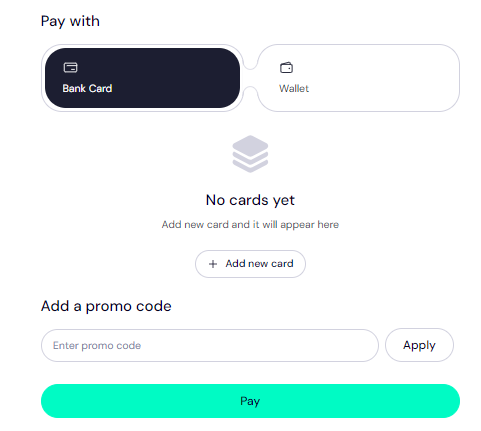
If you don't have a bank card set up yet, click on 'Add new card' and fill in your card details to have it set up.
Trustname also accepts cryptocurrencies for payment!
Trustname's Domain Transfer Promo Code - WELCOME777
- Trustname's standard domain transfer fees are fixed at $14.99 per year, with $0 added for taxes and ICANN fees included.
However, if you use our promo code WELCOME777, we will give you a 50% discount and will only charge $7.77 for transferring your domain - with a 1 year registration added to your domain's current expiry date for free.
After the first year, we will renew your domain name at the standard $14.99 price for .com, .net, and .org TLDs - one of the cheapest offers over a 5 year term compared to other registrars.
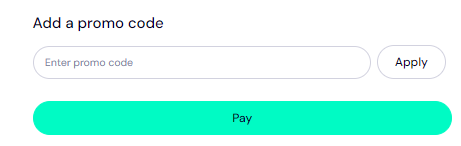
To enjoy our promo, type in WELCOME777 in the 'Add a promo code' section.
Specify The Registration Duration
Select the number of years you want your domain registration to last. You can choose a subscription period between 1 to10 years at a time.
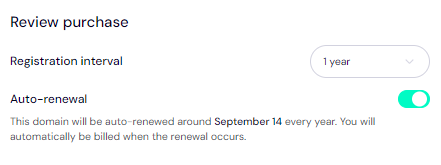
We also advise that you leave the auto-renewal button so we renew your domain name long before it expires for you.
Make Your Payment
Click on the 'Pay' button and follow the on-screen prompts. That's it! Your domain name should be on its way from your current registrar to Trustname.
Was this article helpful?
That’s Great!
Thank you for your feedback
Sorry! We couldn't be helpful
Thank you for your feedback
Feedback sent
We appreciate your effort and will try to fix the article