If you plan to transfer multiple domains to Trustname, you can easily move them all in one fell swoop instead of initiating individual requests. We cannot wait to welcome your portfolio to our platform! With Trustname’s streamlined bulk transfer engine, you can transfer up to 500 domains simultaneously.
In this step by step guide, we will show you exactly how to do it.
By moving your domains to Trustname, you will unlock the most affordable fees on the market, unrivaled domain privacy, world class human support, our first of its kind domain anonymity shield, and convenient cryptocurrency payment options all powered by a truly bulletproof registrar.
Key Takeaways
- Consolidated Efficiency – Save time by submitting up to 500 domain transfers simultaneously in a single paste action.
- Prerequisites are Key – You must unlock your domains, disable Whois privacy, and gather your EPP/Auth codes at your current registrar before starting.
- Risk-Free Processing – Trustname’s validation wizard flags problematic domains beforehand so you can fix errors before paying.
- Accumulated Savings – Take advantage of the "Bulk" or "Super Bulk"pricing programs to save up to $5 per domain on registration, renewal, and transfer fees.
TABLE OF CONTENTS
- Key Takeaways
- Before Initiating the Transfers
- Initiate the Transfer at Trustname
- Trustname’s Bulk Domain Discounts
Before Initiating The Transfers
Before you initiate the transfer process, you must perform a few preparation steps at your current registrar. This ensures that the registry does not reject the transfer requests.
To prepare your domains, complete these three actions at your current registrar.
- Disable WHOIS Privacy
Before transferring your domains to Trustname, you must disable domain privacy on your current registrar.
[+] [List] Green Unordered - Head to your active registrar's domain settings control panel and locate your transfer preferences.
- Select all the domains you want to migrate.
- Disable "Domain Privacy", "WHOIS Privacy", "WHOIS Protection", or any similarly named feature in bulk.
- Disable The Domain Lock
You must also remove the registry lock from all your domains.
[+] [List] Green Unordered - Within your current registrar's transfer settings, select all target domains.
- Disable the Domain Lock or Transfer Lock.
[+] [Callout] Info Insert title here [+] [Callout] Title/Title with Icon -> Do not worry about leaving your domains unprotected during the move Trustname will automatically re-enable a secure domain lock as soon as your domains land in your new account.
- Generate The Auth (EPP) Code
Finally, you must obtain the Auth or EPP codes for your domains from your current registrar. The Auth code is a unique password that allows us to authenticate and authorize the transfer with the registry.
[+] [List] Green Unordered - Locate the Auth/EPP codes in your transfer settings. Your registrar will either display these codes directly in your dashboard or send them to your administrative email.
- Each domain has its own unique Auth code. If your current registrar does not allow you to export these codes in bulk, copy and paste them into a spreadsheet next to their corresponding domain names (one domain per line) so you have them ready.
Initiate The Transfer At Trustname
Once your domains are ready for the transfer, it’s time to initiate the bulk transfer at Trustname.
- Head To Our Bulk Transfer Page
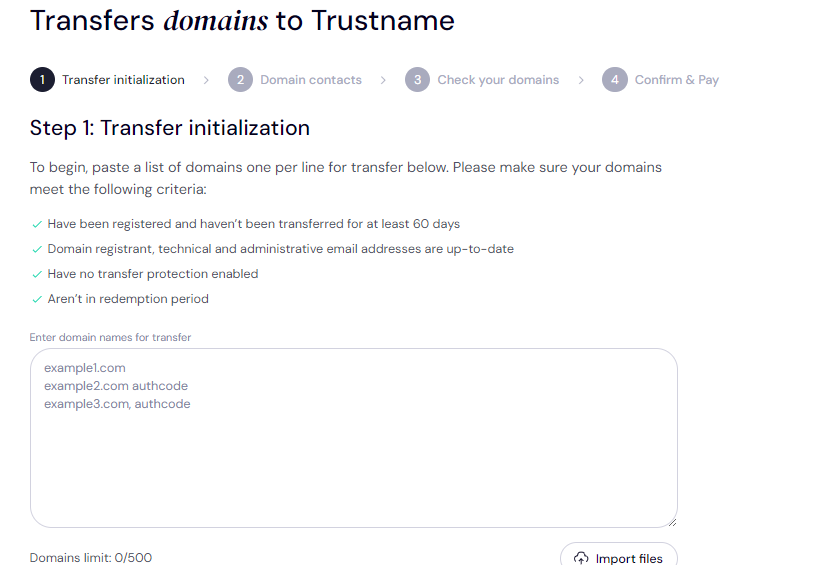
Head to Trustname’s bulk transfer page and paste in your domain names. On Trustname, you can transfer up to 500 domains at once!.
yourdomain1.com authcode123
yourdomain2.net authcode456
yourdomain3.org authcode789
Type in each domain name, give a space, and then paste in the Auth code for that domain name. Then move to the next line to fill in the details for the next domain and so on.
- Specify The Domain Contacts
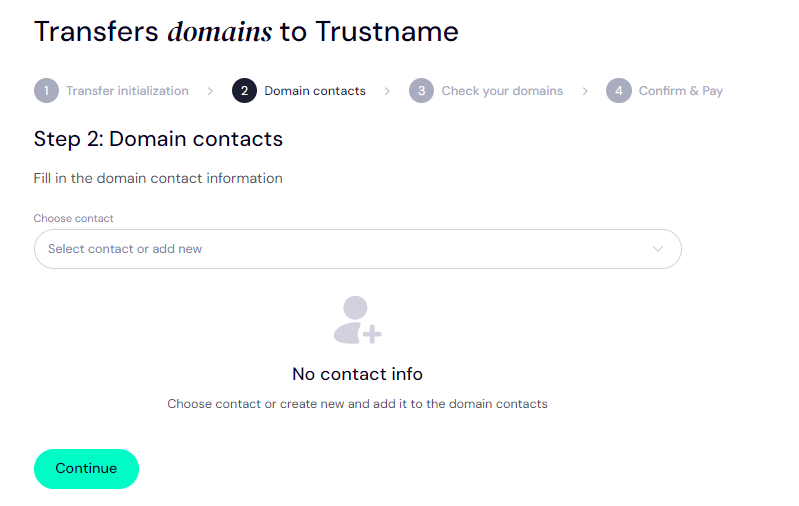
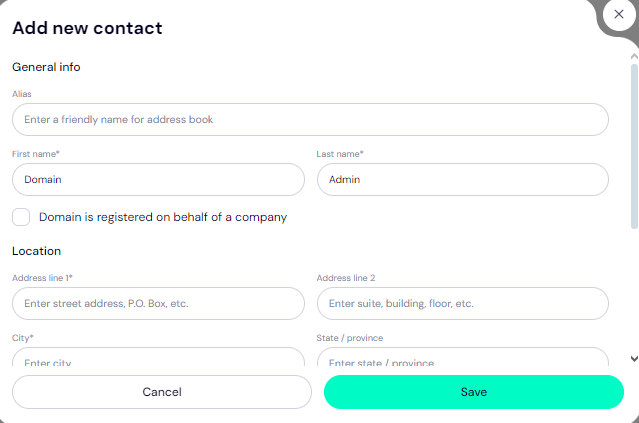
Once you have filled in your domain details, it's time to specify your domain contacts. Click on the "Continue" button. On the next page, specify the contact details you want for your domains. You can choose to use your own details by clicking on the "Choose contact" dropdown and selecting "Add new contact".
Or you can enjoy the highest possible privacy by choosing "Use a pre defined contact" to enable Trustname's Two-Tier Privacy Protection. With the second option, your domains contact info will be.
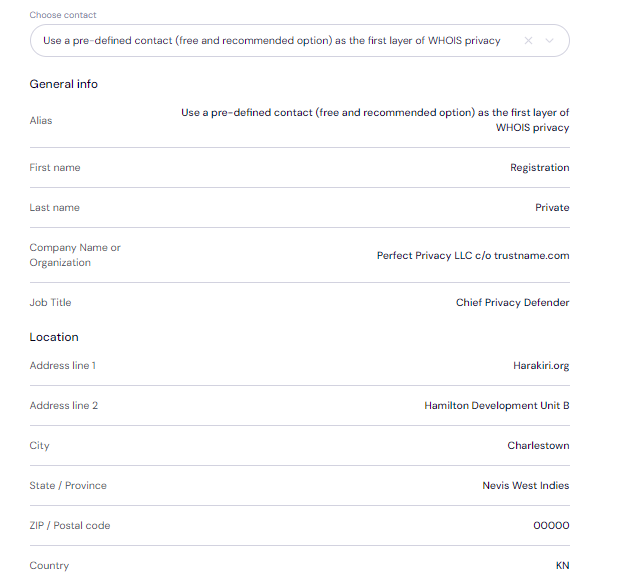
[+] [List] Green Unordered - Registrant: Privacy Proxy Service
- Admin: Privacy Proxy Service
- Tech: Privacy Proxy Service
- Billing: Privacy Proxy Service
Remember, if you choose our pre defined contact, you won't need to verify any details since this information is verified and your domain can move more quickly.
After filling in your domain contact details, click on "Continue".
Want to learn more? Read Trustname’s Two-Tier Privacy Protection to learn more about how our third-party domain registration works.
- Confirm Your Domain List
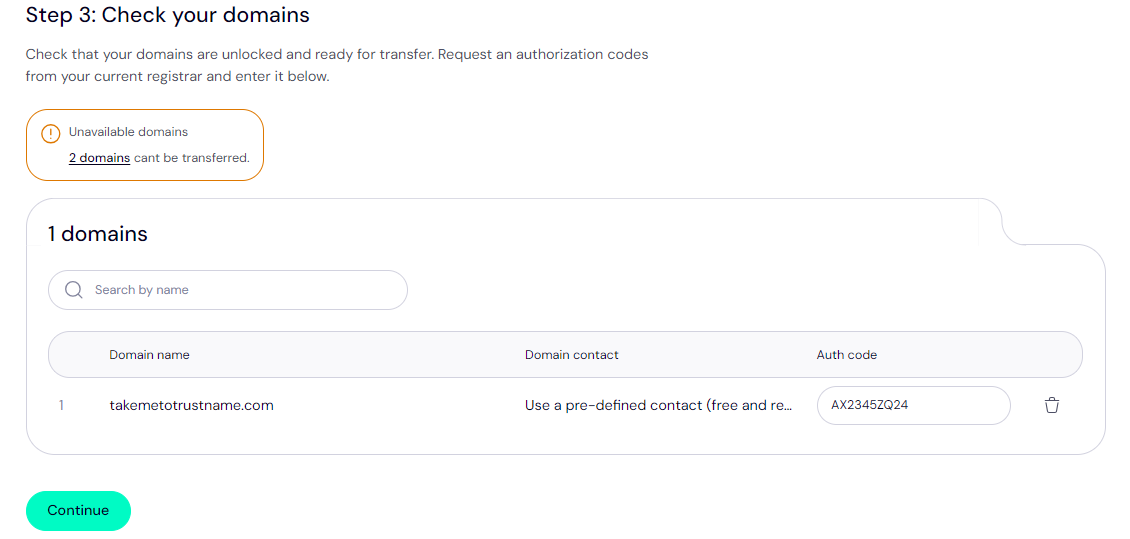
On the next page, you can review your domain list. If our transfer wizard runs into any issues, you'll be notified ahead of time so the transfer doesn’t run into any roadblocks. Click on the number of domains with issues to find out their exact problems.
- Pay For Your Domains
Once you have reviewed your domain list, it's time to pay for their registration at Trustname.
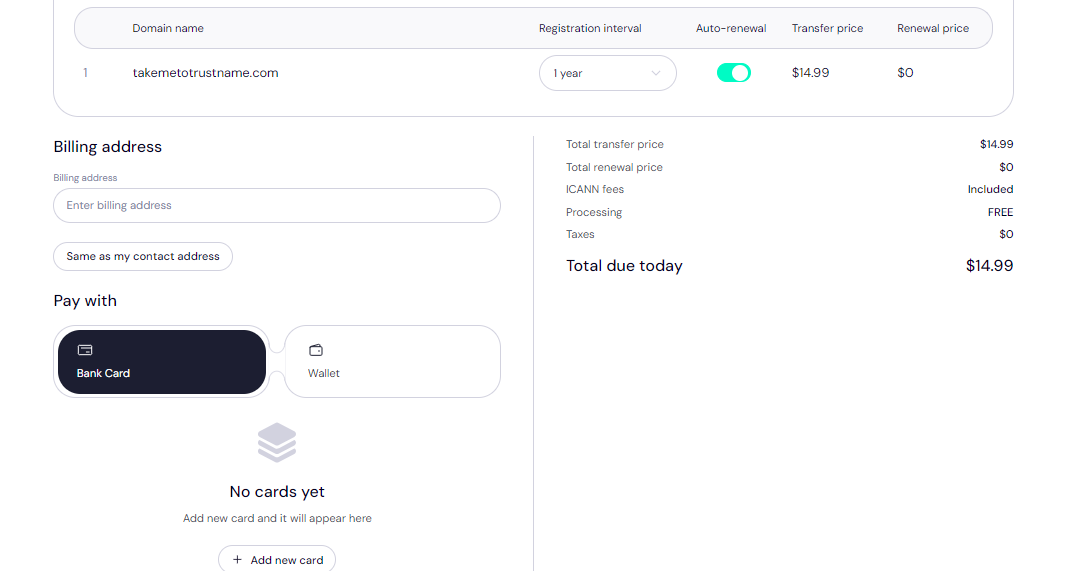
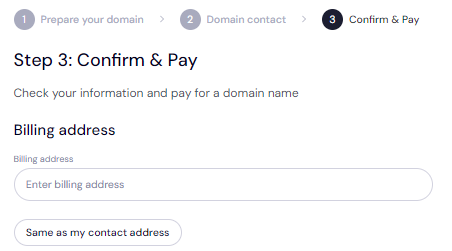
[+] [Callout] Info Insert title here [+] [Callout] Title/Title with Icon -> Once you pay for your transfer, the new registration period you pay for is added to the existing registration period with your current registrar so you're extending each domain's registration by at least 1 year without losing any time you have already paid for.Under "Billing address" you can click on the "Same as my contact address" button so you don't need to fill in your billing address manually.
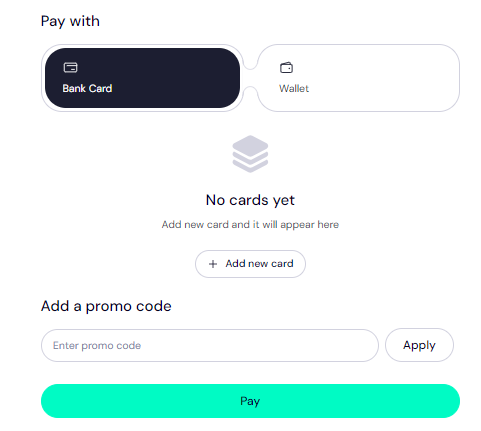
Next, choose your payment method. You can use a bank card or existing funds in your Trustname wallet to make a payment.
[+] [List] Green Unordered - If you don't have a bank card set up yet, click on "Add new card" and fill in your card details to have it set up.
- Trustname also accepts cryptocurrencies for payment!
Finally, specify if you want auto-renewal turned on so you don't have to manually monitor your domain expiry dates.
Complete Payment
Complete the payment and your domains should be on the way to Trustname. Look out for emails from us and your current registrar to ensure you fast track your transfers. Some registrars also allow you to manually approve a domain transfer so you don't have to wait for the typical 5 to 7 days and can have your domains at Trustname in less than 1 hour.
Please note that some TLDs (top level domains) do not support Auth codes, so we automatically skip those TLDs when initializing a bulk transfer. These include TLDs like .es, .ru, and .uk.
Trustname's Bulk Domain Discounts
If you are moving a large portfolio, you can take advantage of our specialized high volume pricing programs.
- Trustname's "Bulk" Pricing Program
Our standard Bulk program helps you save up to $5 per domain on initial 1 year registrations, renewals and incoming transfers.
[+] [List] Green Unordered - Single-Domain Value
Our standard rate is $12.99 for the first year, which includes over $100 worth of essential add-ons (including an SSL certificate, professional email, Premium DNS and lifetime WHOIS privacy).
- The Bulk Advantage
For every 10 domains you register, you save $50 in baseline registration costs and up to $1,000 in complimentary add on values.
- How to Qualify
New customers automatically receive Bulk pricing during their first week. To maintain this discount tier permanently, you simply need to spend a cumulative total of $500 on our platform or fund your Trustname wallet with a minimum of $500.
- Single-Domain Value
- Trustname's "Super Bulk" Pricing Plan
Our Super Bulk plan is tailored for large scale domain investors and enterprises.
[+] [List] Green Unordered - How to Qualify
This elite tier is available to any account that spends $5,000 or more within a single calendar year.
- Instant Activation
The easiest way to unlock Super Bulk pricing immediately is to fund your Trustname wallet with a single deposit of $5,000 or more.
- Funding Bonus
If you deposit or invest $10,000 or more into your Trustname account, we will reward you with an additional 1% to 2% cash bonus added directly to your wallet balance when funding via cryptocurrency or bank wire transfer.
- How to Qualify
To learn more about our tiered volume structures, please read our dedicated article Enjoy Trustname's Bulk Domain Discount.
Was this article helpful?
That’s Great!
Thank you for your feedback
Sorry! We couldn't be helpful
Thank you for your feedback
Feedback sent
We appreciate your effort and will try to fix the article