Connecting your Trustname domain to HostGator web hosting is a straightforward process that takes just a few minutes. All you need to do is obtain HostGator's nameservers and add them directly to your domain settings within Trustname.
You do not need to transfer your domain registration away from Trustname to use HostGator's hosting services. By pointing your domain's nameservers to HostGator, you delegate management of your domain's DNS settings to your web host. HostGator then automatically routes all incoming traffic for your domain to the web server holding your website content.
Key Takeaways
- No Transfer Required – Keep your domain registered safely at Trustname while hosting your website files on HostGator.
- DNS Delegation – Updating nameservers delegates your DNS management directly to HostGator's hosting servers.
- Propagation Window – Nameserver updates typically take 24 to 48 hours to fully propagate across the global internet.
- Re configure Custom Records – Remember to recreate any existing email (MX) or custom DNS records inside HostGator's dashboard after updating nameservers.
TABLE OF CONTENTS
- Key Takeaways
- Connecting Your Domain to HostGator
- Understanding Nameserver Formats
- Confirming the Nameserver Connection
- Consolidating Your Domain and Hosting with Trustname
Connecting Your Domain to HostGator
To connect your Trustname domain to HostGator, follow these two main steps.
- Obtain the Nameservers from HostGator
If you just purchased a web hosting plan from HostGator, your assigned nameservers will be listed in the order confirmation email they sent you. Alternatively, you can find your nameservers directly inside your HostGator Customer Portal.
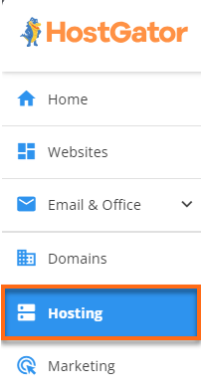
[+] [List] Green Ordered - Log into the HostGator Customer Portal and click on "Hosting" from the left side menu.
- If you have a single hosting package in your account, scroll down to the "Server Information" section.
- On the "Hosting Plan Details" page, you will find your assigned web hosting nameservers.
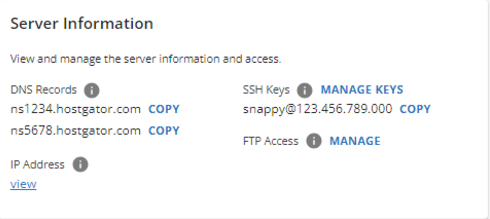
- Copy the two nameservers so you can paste them into your Trustname portal.
- Add the Nameservers on Trustname
Once you have obtained the nameservers from HostGator, connect them to your domain inside Trustname.
[+] [List] Green Ordered - Log In to Your Trustname Account
Visit the trustname.com website, click on "Login" in the top right corner, and enter your login details. If you have two-factor authentication enabled, copy the time based code from your authenticator app and paste it into the Trustname portal.
- Head to Your Domain Settings
In the header section of the main page, click on the "Domains" dropdown menu and select "Registered domains" to access your domain list.

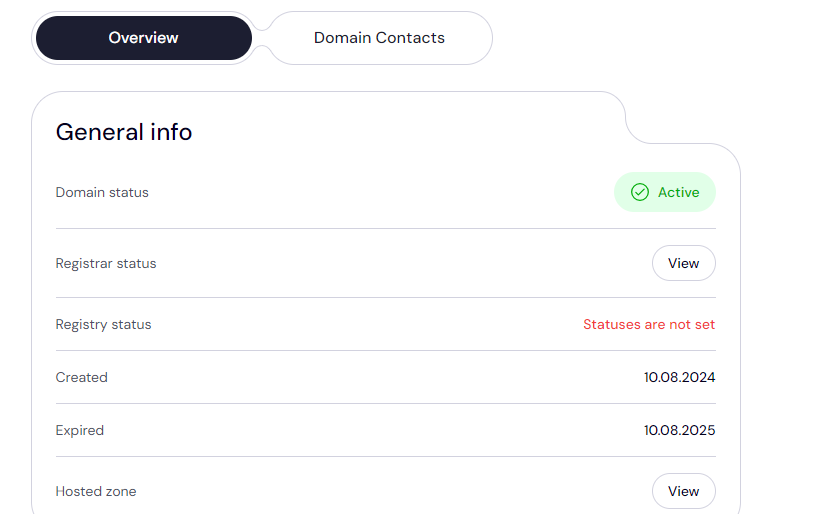
Click on the specific domain whose nameservers you want to configure. You will be redirected to the domain management settings and contact details page.
- Access and Edit Nameserver Settings
Scroll down to the "Domain Nameservers" section to view your current nameservers.
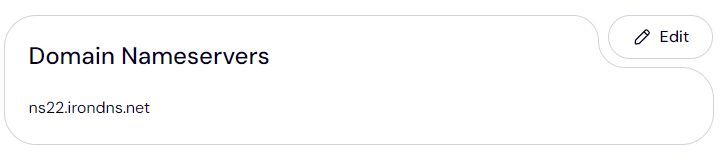
Click on the "Edit" button to begin configuring your nameservers. Type or paste the nameserver addresses you copied from HostGator into the fields then click "Save". That’s it!
- Log In to Your Trustname Account
Understanding Nameserver Formats
Domain nameservers generally follow a standard format: a prefix such as ns1 or ns2 (which indicate the primary and secondary nameservers, respectively), followed by the domain name of the web host or DNS provider.
Ex - A typical nameserver format looks like this.
- ns1.hostingprovider.com
- ns2.hostingprovider.com
Once you update your nameservers on your Trustname domain, it will typically take between 24 and 48 hours for the changes to fully propagate across the global internet.
If you previously configured custom email (MX) or other custom DNS records on Trustname, you will need to re-configure those same records inside HostGator's DNS settings once the nameservers are pointed.
Confirming the Nameserver Connection
To confirm that your nameserver changes have taken effect.
- Simply visit your website in a browser to check whether it displays your HostGator content properly.
- Alternatively, use a public DNS lookup tool like WhatsMyDNS. Type in your domain name and select "NS" from the dropdown menu to see if your HostGator nameservers are resolving globally.
Consolidating Your Domain and Hosting with Trustname
The most convenient way to manage your digital presence is to consolidate both your domain registrations and web hosting directly on Trustname. We offer domain registrations, web hosting, and professional email services so you have everything required to get your website up and running in no time.
Here are the benefits of consolidating with us.
- Simplified Management
Manage all of your domain names, web hosting accounts, and DNS records from a single, unified dashboard.
- Cost Savings & Discounts
Save money with Trustname’s bundled offers including a free domain name included with every web hosting plan.
- Zero Technical Setup
Your nameservers are configured automatically upon signup, meaning you won't ever have to copy and paste nameservers manually.
Get your domain and hosting from Trustname today!
Was this article helpful?
That’s Great!
Thank you for your feedback
Sorry! We couldn't be helpful
Thank you for your feedback
Feedback sent
We appreciate your effort and will try to fix the article