Connecting your Trustname domain to DigitalOcean is a simple process that allows you to use DigitalOcean's hosting services without transferring your domain. By updating your domain's nameservers in Trustname, DigitalOcean takes over DNS management and directs your domain to your hosted website.
Key Takeaways
- No Domain Transfer Required – You can keep your domain registered with Trustname while hosting your website on DigitalOcean.
- Update Your Nameservers – Replace your current Trustname nameservers with DigitalOcean's nameservers in your domain settings.
- DNS Propagation Takes Time – Changes typically take 24 to 48 hours to fully propagate across the internet.
- Reconfigure Existing DNS Records – If you use custom DNS records or email services, you'll need to set them up again in DigitalOcean.
- Verify The Connection – Use your website or a DNS lookup tool like WhatsMyDNS to confirm that your new nameservers are resolving correctly.
TABLE OF CONTENTS
- Key Takeaways
- Connect Your Domain To DigitalOcean
- Nameserver Format
- Confirming The Nameserver Connection
- Consolidating Your Domain And Hosting With Trustname
If you want to connect your domain name on Trustname to web hosting at DigitalOcean, all you need to do is obtain DigitalOcean's nameservers and add them to your domain settings in Trustname.
You don't need to transfer your domain out of Trustname to use a third-party hosting service. By pointing your domain nameservers, you delegate management of your domain's DNS settings to DigitalOcean who in turn, points all searches on your domain name to the right web server hosting your website content.
Connect Your Domain To DigitalOcean
To connect your Trustname domain to DigitalOcean, follow these steps –
- Obtain The Nameservers On DigitalOcean
If you just bought a droplet from DigitalOcean, the nameservers will be specified in the order confirmation email they sent to you.
Alternatively, DigitalOcean lists out their nameservers all over their website.
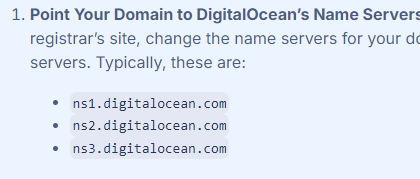
DigitalOcean's nameservers are ns1.digitalocean.com, ns2.digitalocean.com, etc.
- Add The Nameservers On Trustname
Once you have obtained the nameservers from DigitalOcean, it's time to connect them to your domain at Trustname. Follow these steps –
[+] [List] Green Ordered - Login To Your Trustname Account
Visit the trusname.com website, click on 'Login' in the top right corner, and enter your login details. If you have two-factor authentication on, you'll need to copy the time based code in your authenticator app and paste it in the Trustname portal.
- Head To Your Domain
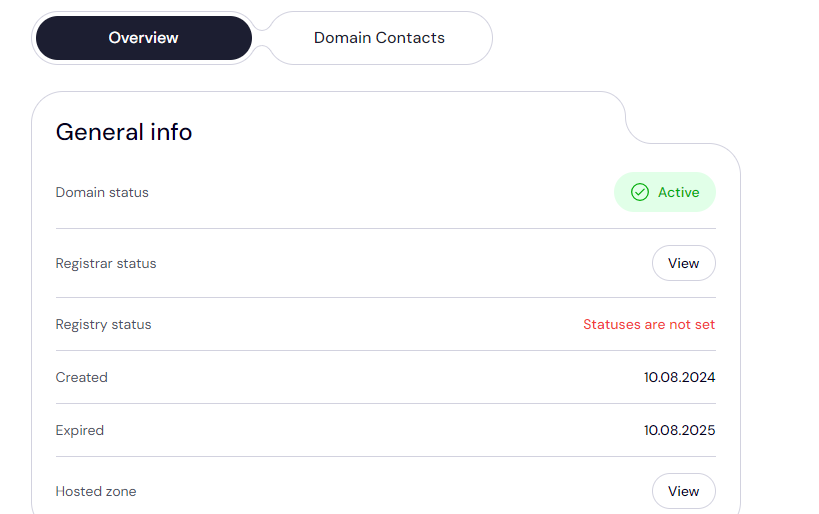
SettingsNext, in the header section of the main page, click on the 'Domains' dropdown and select 'Registered domains' to access your domain list.
Click on the domain whose nameservers you want to configure.

You'll then be redirected to the domain management settings and contact details.
- Access The Nameserver Settings
Scroll down to the 'Domain Nameservers' section to see your current domain nameservers.
Click on the 'Edit' button to begin configuring your nameservers.
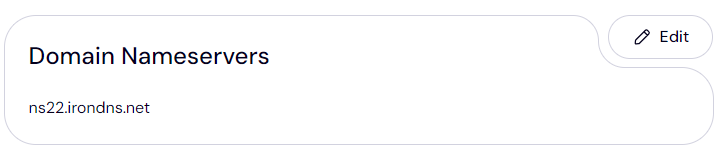
Type in the nameserver addresses you copied from DigitalOcean and click 'Save'. That's it!
- Login To Your Trustname Account
Nameserver Format
Domain nameservers come in the following format a prefix e.g. "ns1" and "ns2", which indicate the primary and secondary nameservers, respectively, followed by the domain name of the web host or DNS provider.
Once you have tweaked your nameservers on your Trustname domain, it will typically take between 24 to 48 hours for the changes to be propagated across the internet.
If you already had email or custom DNS records set, you would need to re-configure them on DigitalOcean's side.
Confirming The Nameserver Connection
To confirm that the nameserver changes have been effected, simply check your website to see that it's functioning properly or use a DNS lookup tool like WhatsMyDNS type in the domain name and select 'NS' from the dropdown to see that the nameservers are resolving globally.
Consolidating Your Domain And Hosting With Trustname
The most convenient way to enjoy your domain registration and web hosting conveniently is to consolidate both services on Trustname. We offer domain registration, web hosting, and email so you have everything to get your website up and running in no time.
First, your management is simplified since you can manage all your web assets from one dashboard. You also save costs and can enjoy Trustname's discounts on bundle offers you get a free domain with every web hosting plan.
What's more? Your nameservers are set automatically and you won't have to add them manually.
Read how to transfer your domain to Trustname for more details.
Was this article helpful?
That’s Great!
Thank you for your feedback
Sorry! We couldn't be helpful
Thank you for your feedback
Feedback sent
We appreciate your effort and will try to fix the article