Renewing your SSL certificate helps keep your website secure and trusted by visitors. This guide explains the renewal process, why SSL certificates expire, and how to ensure your website stays protected.
Key Takeaways
- Renew Early – Renew your SSL certificate before it expires.
- Use Auto-Renewal – Avoid downtime with automatic renewal.
- Complete Validation – Finish the required verification process.
- Install Correctly – Ensure the renewed certificate is installed.
- Stay Secure – Prevent browser warnings and security risks.
SSL certificates give your brand credibility, but even good things don't last forever certificate authorities made it compulsory for webmasters to renew their SSL certificates every 12-13 months. Luckily, if you got your SSL certificate from a top domain registrar like Trustname, it will renew automatically before expiration.
While web owners are better off auto-renewing their SSL certificates, you can do it manually if you have to. The renewal process is almost the same as purchasing a new SSL certificate, and the process takes less than 30 minutes. Let's dive in to see how webmasters stay up to date with their SSLs.
How To Renew Your SSL Certificate
- Generate a Certificate Signing Request (CSR)
A certificate signing request is an encrypted file that informs your certificate authority to issue a new SSL certificate for your website. A CSR contains special details about your website, including public and private keys, your domain name, and organization's name (Trustname gives you a proxy name so your identity is protected).
You can generate a new CSR by using a CSR generator tool or your cPanel.
Check out these resources for more information:
Create a CSR with a CSR generator tool
Once you are done generating your CSR, you should end up with an encrypted block of text that looks like this…
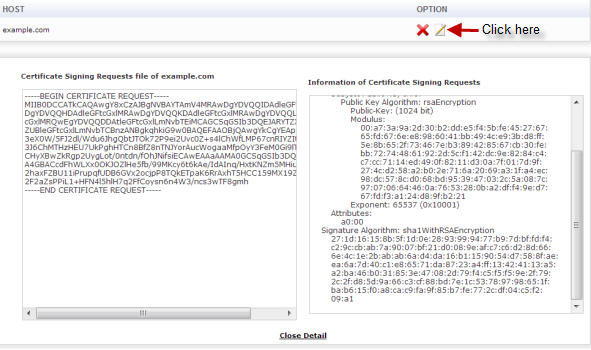
Once you have this certificate, go to your domain registrar and paste the document in the provided space.
- Submit The CSR To Your Preferred Certificate Authority
After generating your CSR, you can use your domain registrar account dashboard on platforms like Trustname or follow the process on your selected certificate authority.
Since you are renewing your SSL certificate (not buying for the first time), you can skip the SSL selection process and paste your CSR in the required portal.
Using Trustname as an example:
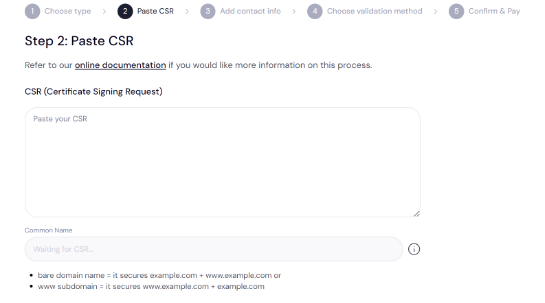
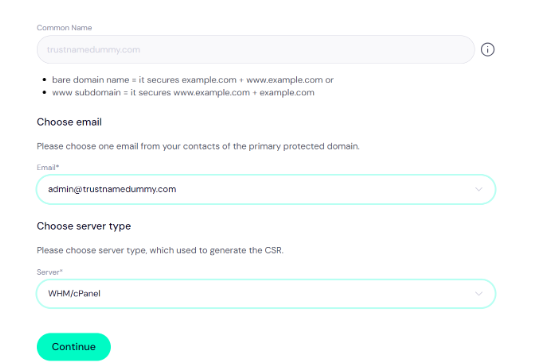
After the cPanel is done processing the CSR and getting the necessary details, you will submit an email and indicate the server type you used to generate your new CSR.
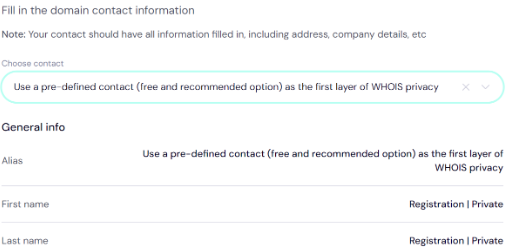
After you are done submitting your emails, you will be asked to provide your contact info. However, Trustname provides you with a free, anonymous contact to help you maintain your privacy.
When you are done, the next step is to pick a validation method for your identity. You can choose from among domain, email and file verification methods.
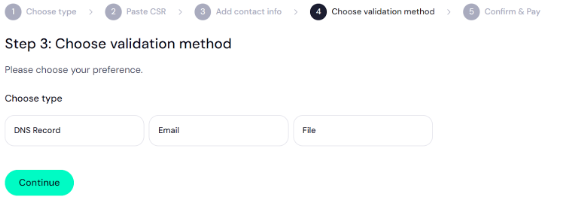
After choosing a validation method, confirm and pay for your SSL certificate. You can pay by using a bank card or through your crypto wallet.
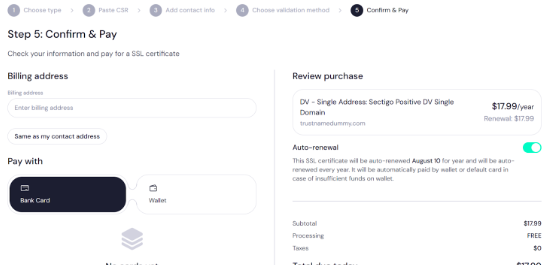
To avoid repeating this process in a year, simply approve auto-renewal and ensure your wallet is funded before the next expiration date.
- Get Your New SSL Certificate
Once you pay, all your website details will be submitted to the issuing certificate authority and you will be contacted through your validation method once they approve a new SSL certificate for you.
- Complete The Domain Control Validation Process (If there's one)
Some certificate authorities, like Sectigo (who we are partnered with), offer an extra layer of protection for your SSL certificate called Domain Control Validation (DCV). DCV is a process used by CAs to determine if the webmaster making the SSL certificate request is authorized to use the domain listed in the CSR.
If you are renewing OV or EV SSL certificates, you may need to submit additional documents and wait a few more days before your SSL certificate request is approved.
- Install Your SSL Certificate
Once your SSL certificate arrives in your mail (or any other validation method), install it on your server. In most cases, Trustname and other domain registrars will add the certificate to your website automatically.
If it is not added, go to your server's documentation page, install the SSL certificate directly and upload it to your server. You can refer to this resource for more information on how to renew and install your SSL certificate.
How to Install an SSL CertificateTo test that your certificate works, check all your web pages for the 'https' prefix in your URL and the padlock symbol in the left corner of your browser. Once you see these icons, your website now has a verified SSL certificate.
How Often Are SSL Certificates Renewed?
Every 12-13 months. Trustname's SSL certificates usually expire in a year and the renewal process takes around 2-12 hours. However, other domain registrars may take up to 5 days to renew OV SSL certificates and 2 weeks for EV SSL certificates.
We advise their clients to start their certificate renewal process 30 days before the expiration date. From all indications, the easiest way to renew your SSL certificate is by setting up an auto-renewal process on your domain registrar.
Luckily, Trustname offers a free SSL certificate that auto-renews once you subscribe for another year. Also, you can set your DV, OV and EV certificates to auto-renew before they expire.
Why Do SSL Certificates Expire?
- To Ensure Security Protocols Are Up To Date
SSL certificates need periodic security upgrades to remain effective. Also, SSL/TLS protocols and algorithms evolve over time and the SSL database needs to stay up to date with current technology.
Hackers work hard to penetrate the SSL ecosystem and security experts at certificate authorities need to make sure protocols are hack-proof. The only way these CAs can stay ahead is by sending out regular updates and mandating that webmasters stay up to date by renewing their SSL certificates.
- To Prevent Hackers From Gaining Access To Your Private Keys
When you host your website with a provider like Trustname, we will create two keys for you - a public key and a private key. These keys work like passwords and only your website server has access to the private key.
[+] [Callout] Warning Insert title here [+] [Callout] Title/Title with Icon -> If hackers get hold of your keys, your website is vulnerable to 'man in the middle' attacks, phishing scams and other forms of cyber exploits. This means bad actors can access private data (like credit cards) on your website and copy sensitive information from your platform.
Changing your SSL certificate every 12-24 months prevents threat actors from getting a permanent backdoor to your website. In the unlikely scenario where hackers get access to your keys, they will only have access to your platform for a short time before losing it to the SSL certificate renewal process.
- To Prevent Accumulation Of Revoked Certificates
The Certificate Authority Browser (CAB) Forum's standard timeline for renewing SSL certificates is 24 months. According to CAB (a voluntary forum of CA and other internet software providers), validation should take place at least once in 2 years so expired domains don't pile up and damage the ecosystem.
Thanks to this process, certificate authorities can quickly filter out SSL certificates that are inconsistent, compromised, or damaged. Also, certificate authorities and web hosts can easily transition to more agile protocols if they are dealing with only updated websites.
- To confirm That You Still Own/Run Your Website
There's no shortage of abandoned online businesses and dormant websites are a natural side effect of this occurrence. If a web owner stops using a website, their web host will quietly deregister them and the SSL certificate attached to the domain will expire.
[+] [Callout] Success Insert title here [+] [Callout] Title/Title with Icon -> If your SSL certificate expires and the domain registrar has not pulled down your website, web visitors will get a warning message when they browse your website. However, if your SSL certificate (and hosting subscription) are active, it means you are still in control.
What Are The Risks Of Having An Expired SSL Certificate?
- Potential Data/Security Breaches
An SSL certificate is your first line of defense against hackers who want to compromise your website and obtain valuable information. If the certificate expires, your website will become especially vulnerable to Man-in-the-Middle attacks.
[+] [Callout] Warning Insert title here [+] [Callout] Title/Title with Icon -> Man-in-the-Middle (MITM) attack is a common form of cyberattack where hackers put themselves between two parties to intercept data exchange. When they acquire this data, they often make illegal purchases or demand ransom for sensitive files in extreme cases.
SSL certificates contain caches of encrypted data and serve as a communication box between web browsers and web servers. Therefore, its absence leaves your web visitors 'naked' when they visit your site. That's why web browsers are quick to put up a warning sign for anyone visiting a website without an active SSL certificate.
- You Get a Security Warning Message On Your Website
When an SSL certificate expires, three things will immediately happen to the website. First, the 'HTTPs' prefix that comes before your domain name will be removed. Secondly, the padlock icon in the left corner of your web browser will disappear. The absence of that security icon tells web visitors that your website is compromised.
The third and most devastating effect is that your web browser (whether Chrome, FireFox or Safari) will put up a clear warning on your website landing page. This warning will advise web visitors not to spend further time on the website due to potential security threats.
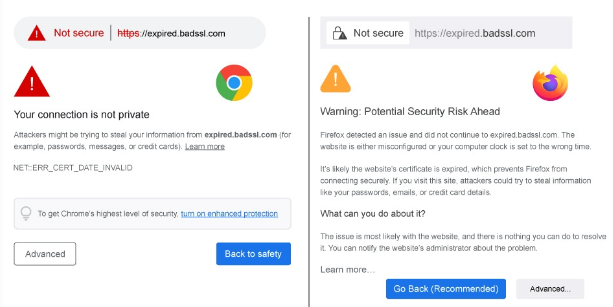
Your website is your online office and putting up an 'about to be demolished' sign will have negative effects on your brand image and public perception. If your website has already built brand authority within your business niche, search engines will start excluding you from their algorithm.
- Your SERP Rankings Will Plummet
Being an online brand authority in any industry or niche means you've worked very hard to distinguish yourself, add value and attract traffic. Google and other search engines reward your hard work by pushing more web visitors to your website.
[+] [Callout] Warning Insert title here [+] [Callout] Title/Title with Icon -> However, if your SSL certificate expires, search engines will notice your website is compromised and they will remove it from Search Engine Results Pages (SERP). For example, Google's recent SERP ranking algorithm filters for the 'HTTPs' seal before indexing websites.
Without the 'HTTPs' stamp, Google will archive your website and your SERP rankings will fall. This outcome means all your branding, SEO, and content marketing efforts will be wasted. With Trustname, you can set your SSL certificate to auto-renew and continue building your online brand authority without fear.
- New Customers Will Not Engage
Most webmasters operate websites because they want to turn a profit. In order to do this, they need to attract traffic, maintain an engaged audience and sell products/services strategically. All these things are impossible if you have a website with an expired SSL certificate.
Let's assume you sell tech courses through your website. If an interested applicant stumbles on your page and sees a 'potential attack' message first, that applicant will not return to your website again.
[+] [Callout] Warning Insert title here [+] [Callout] Title/Title with Icon -> As a business minded webmaster, losing out on potential revenue is one of the main reasons why you should make sure to auto-renew their SSL certificates as and when due.
How Do I Know If My SSL Certificate Is Renewed?
- Through a Confirmation Message
When you are renewing your SSL certificate, there's a section where you choose your validation method from among three options: email, domain and file. When your renewed SSL certificate is approved, your certificate authority will notify you through your chosen validation method.
- Through The Padlock Security Icon
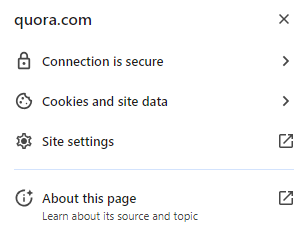
There is always a padlock security icon located at the top left corner of your web browser when you surf web pages. When you click on the icon, you can see if your SSL certificate is up to date and if your connection is secure. If you use Chrome, you will also see other details about the website.
- Through 'HTTPs'
The 'HTTPs' marker that comes before domains is an indication that that website is protected by an SSL certificate. If you search any of your web pages and the domain is preceded by the 'HTTPs' suffix, it means your SSL certificate was successfully renewed.
Trustname's SSL Certificates Come With Auto-renewal
With Trustname as your Domain Registrar, you don't need to worry about going through a tedious process to renew your SSL certificate. Once you buy an SSL certificate on Trustname, it will auto-renew 30 days before its expiration date (unless you instruct otherwise).
Was this article helpful?
That’s Great!
Thank you for your feedback
Sorry! We couldn't be helpful
Thank you for your feedback
Feedback sent
We appreciate your effort and will try to fix the article