An SSL certificate encrypts the connection between your website and its visitors, safeguarding sensitive data while boosting your search engine rankings and brand credibility. Choosing the right validation tier Domain Validation (DV), Organization Validation (OV), or Extended Validation (EV) depends on your business type, the level of trust you need to project, and your budget.
This guide breaks down how each certificate works and compares their key differences to help you select the best option for your site.
Key Takeaways
- Validation Levels – DV validates domain control only; OV verifies business legitimacy EV provides the highest level of corporate background vetting.
- Issuance Time – DV certificates are issued in minutes, OV certificates take 1 to 3 business days, and EV certificates take up to 10 business days.
- Target Audience – DV is ideal for blogs, personal sites, and small businesses OV and EV are designed for registered businesses, Ecommerce platforms, and enterprise organizations.
- SEO & Trust Impact – All SSL certificates enable HTTPS and encrypt data, but OV and EV certificates provide visible organizational credentials in web browsers to maximize visitor trust.
SSL stands for Secure Sockets Layer. It is a protocol that secures and authenticates the connection between your web server and a user's web browser. Think of it as a digital security officer who ensures that data exchanged on the web remains inaccessible to unauthorized third parties.
An SSL certificate is a digital credentials file that contains the necessary data to verify a website's identity and establish an encrypted connection. It contains vital information about your website, including your domain name, the issuing Certificate Authority (CA), their digital signature, the issuance date, validity period, and public key. Users can easily access this information by clicking on the padlock icon next to the URL in the browser's address bar.
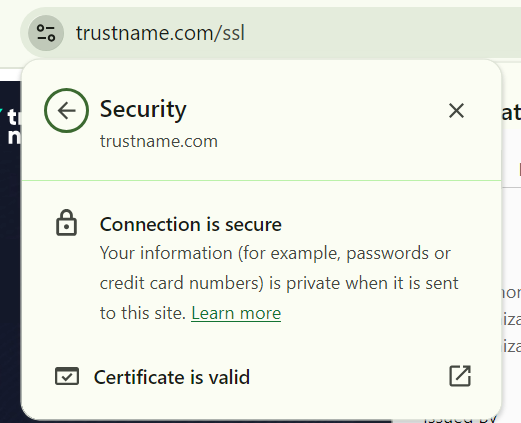
SSL works by establishing an encrypted connection between a user’s browser and your web server through cryptographic key pairs.
- Public and Private Key Pair
For data encryption to occur, a private key and a public key are required. The public key is embedded in your SSL certificate and is publicly accessible. The private key remains strictly confidential and is stored securely on your web server. Any data encrypted using your public key can only be decrypted by the corresponding private key, and vice versa.
- Handshake Request
When a user visits your website, their browser sends a request to your web server to establish a secure connection.
- Certificate Verification
Your web server responds by sending a copy of your SSL certificate (which includes your public key) to the browser. The browser checks the certificate against trusted Certificate Authorities to verify its legitimacy.
- Session Key Creation
Once the certificate is validated, the browser generates a unique session key, encrypts it using your public key, and sends it back to your server. The server then uses its private key to decrypt the session key.
- Encrypted Communication
Both the browser and the server use this session key to encrypt and decrypt all transmitted data for the remainder of the browsing session.
- SSL vs. TLS
SSL is the original cryptographic protocol used to secure internet communications. TLS (Transport Layer Security) is the modernized, updated version of SSL built with robust security features to patch vulnerabilities found in older SSL protocols.
Today, the term "SSL" is frequently used as an industry shorthand to refer to TLS.
- HTTPS
HTTPS (Hypertext Transfer Protocol Secure) is not a protocol itself, but rather the secure implementation of standard HTTP. The added "S" indicates that data transmitted between the web browser and the server is encrypted using SSL/TLS.
You need an SSL certificate to prove that your website is secure for browsing, sharing information, and processing transactions.
- User Safety & Access
Without an SSL certificate, modern web browsers like Google Chrome will flag your site as "Not Secure," blocking users from accessing it.
- SEO Rankings
Search engines prioritize user security. Having an active SSL certificate (HTTPS) is a confirmed Google ranking factor, helping secure websites perform better in search results.
SSL certificates are categorized by their structural scope and validation strength.
- Scope Classifications
[+] [List] Green Unordered - Single-Domain SSL Certificates
Secures one specific domain name and all pages beneath its directory path.
- Wildcard SSL Certificates
Secures a main domain name as well as an unlimited number of its first-level subdomains (e.g., about.johndoe.com or support.johndoe.com).
- Multi Domain SSL Certificate
Secures multiple distinct domain names or subdomains under a single certificate management profile.
- Single-Domain SSL Certificates
- Validation Tiers
[+] [List] Green Unordered - Domain Validation (DV)
The most basic and affordable tier. DV requires only proof of administrative control over the domain name, making it fast to issue. It is ideal for blogs, portfolios, and informational sites that do not collect sensitive user data.
- Organization Validation (OV)
Designed for businesses, non profits, and government entities. To obtain an OV certificate, you must submit documentation verifying your business identity, physical address, and phone number through third-party databases.
- Extended Validation (EV)
The highest security tier, requiring extensive vetting across up to 18 validation checks, including corporate status checks and legal entity verification. EV certificates are provided through top CAs like DigiCert to offer maximum user trust.
- Domain Validation (DV)
No security technology is completely infallible, including SSL.
While SSL utilizes public/private key encryption to protect data in transit, misconfigurations on your server can expose vulnerabilities. Additionally, cybercriminals can host phishing scams on encrypted sites. This is why pairing an SSL certificate with robust hosting security is essential.
Trustname addresses this by providing free 256 bit encryption SSL certificates, DNSSEC protection, and Domain Defender Protection across all hosting accounts.
Your optimal choice depends on your website structure and business operations.
- Blogs & Portfolios
A free DV Single Domain SSL certificate provides complete encryption for standard content.
- Corporate & Business Sites
An OV SSL certificate validates your business entity and enhances corporate credibility.
- Ecommerce & Enterprise
An EV SSL certificate provides maximum validation and consumer reassurance for sites handling sensitive financial or personal data.
Yes, you can upgrade a standard SSL certificate to a Wildcard or Multi-Domain SSL certificate. While not all CAs permit mid term conversions, flexible providers like DigiCert and Trustname allow users to scale certificate scopes as their network expands.
Neither is inherently better it depends on your specific infrastructure.
- Wildcard SSL
Ideal if you currently hostm or plan to launch multiple subdomains under your main domain.
- Regular SSL
Best suited if you only need to secure a single domain or a single dedicated subdomain.
You can acquire an SSL certificate through web hosting providers like Trustname or directly from Certificate Authorities such as DigiCert and Sectigo. When you purchase a hosting plan with Trustname, a free lifetime DV SSL certificate is automatically included alongside malware scanning and vulnerability assessment tools.
Pricing varies based on validation depth and domain coverage.
- DV Certificates
Free for domains hosted on Trustname, or starting at $24.99/year for standalone registrations.
- OV Certificates
Starting at $34/year ($2.80/month) with breach warranties ranging from $10,000 to $250,000.
- EV Certificates
Starting at $280/year ($23/month) with a $250,000 warranty and DigiCert verification.
Yes. Paid OV and EV SSL certificates provide authenticated organizational validation, trust indicators, and financial warranties that compensate your business in the rare event of a cryptographic security breach.
While technically possible, running a website without SSL is strongly discouraged. Unencrypted websites trigger browser warnings ("Not Secure"), lose organic search visibility due to SEO penalties, and discourage visitors from staying on your site.
Look at the browser address bar. A secure website displays https:// instead of http:// alongside a closed padlock icon preceding the domain name.
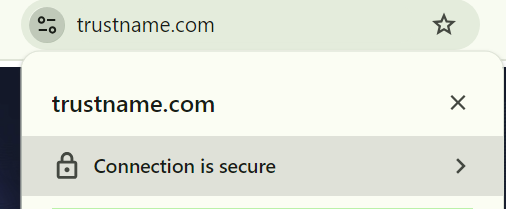
Setting up SSL involves four key steps.
- Purchase an SSL certificate from your host or a trusted CA.
- Generate a Certificate Signing Request (CSR) on your web server.
- Complete the required validation checks (DV, OV, or EV).
- Install and configure the issued SSL certificate files on your web server.
Yes. Many providers offer free standard DV SSL certificates. Trustname includes free lifetime DV SSL certificates for all domains registered or hosted on our platform.
Free SSL certificates typically offer basic Domain Validation only. They often lack dedicated technical support, require frequent manual renewals (every 90 days), and offer no financial breach warranties. Trustname addresses the renewal burden by providing automated, lifetime-managed free SSL certificates.
Yes. This is called a self signed certificate, where the digital signature is generated using your own server key rather than a recognized Certificate Authority.
A self signed SSL certificate is signed by the developer or server administrator rather than a publicly trusted CA. While free and useful for internal testing or staging environments, public browsers will flag self-signed sites with security warnings because the identity cannot be independently verified.
Industry standards restrict public SSL/TLS certificate lifespans to a maximum of 13 months (397 days) to ensure key security and updated validation details.
Google does not issue standalone SSL certificates for general external websites. However, Google provides free managed certificates for sites hosted on Google Cloud Platform (GCP). For third party hosting, certificates must be obtained through CAs like DigiCert or Let's Encrypt.
Yes, provided you are using a Wildcard or Multi Domain SSL certificate. You can deploy it across multiple servers using one of three methods
- Certificate Export/Import
Export the certificate and private key from the originating server and import them onto target secondary servers.
- SSL Termination at Reverse Proxy
Terminate SSL connections at a front-end proxy (e.g., Nginx or Apache) and route internal traffic to backend servers.
- Load Balancer Integration
Deploy the certificate directly to a load balancer to manage incoming encrypted traffic across a server cluster.
An "untrusted certificate" error occurs when a certificate is self signed, expired, or issued by an unrecognized provider. This can often be resolved by installing the correct Intermediate SSL Certificate chain on your server to link your certificate to the CA's root authority.
No. SSL certificates are valid for up to 13 months and must be periodically renewed to maintain uninterrupted HTTPS encryption.
When an SSL certificate expires, data transmission reverts to an unencrypted state. Browsers immediately present visitors with prominent "Connection is Not Secure" warnings, driving away web traffic and exposing unencrypted data to potential interception.
Once your SSL certificate expires, data transmission between your server and browser will no longer be secure. This means users will get a "Not Secure" message anytime they’re trying to access your domains or subdomains. It looks like this.
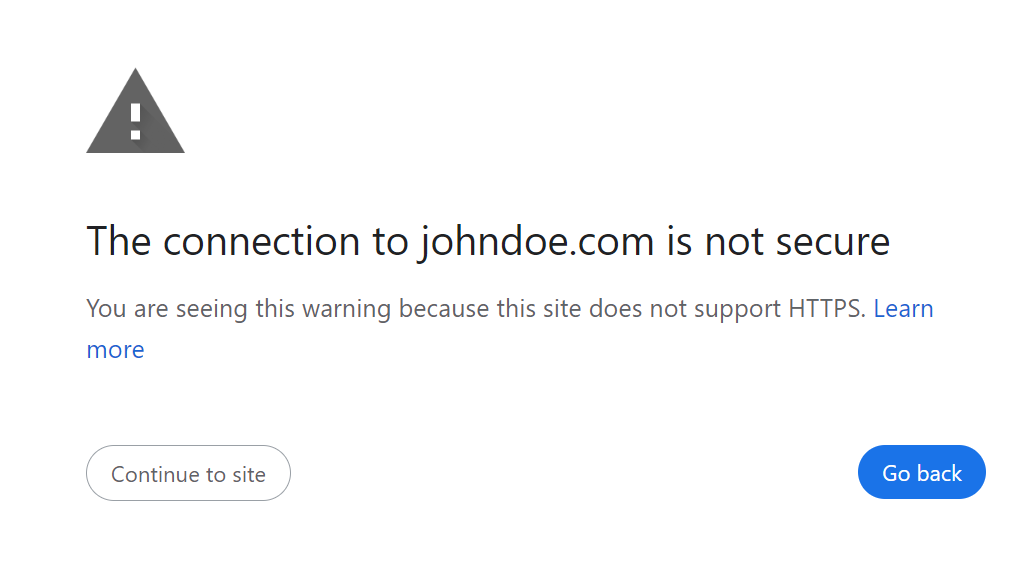
During this period, anything can happen. The bad guys can take advantage of this to infiltrate your website and steal sensitive information. To avoid getting this error, always check with your provider (or manually by clicking the padlock on your browser) to know when your SSL certificate will expire.
A better option will be to request a notification from your web host before the expiration date.
- Click the Padlock icon next to your URL in the browser address bar.
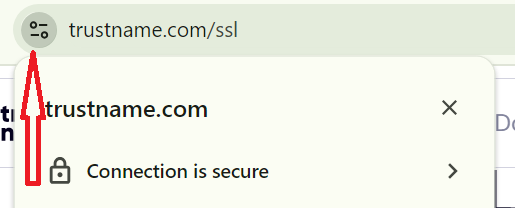
- Select Connection is secure > Certificate is valid.
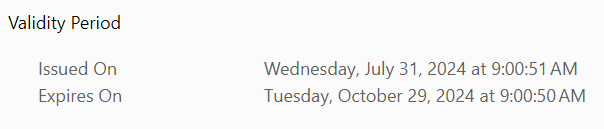
- View the pop up window to inspect the exact Valid from / Valid to date range.
- Generate a new Certificate Signing Request (CSR) on your server or host dashboard.
- Submit the CSR through your provider's SSL renewal page.
- Complete any required re validation checks.
- Download and install the updated SSL certificate files on your web server.
Some web hosts offer auto renewal options for your SSL certificates. However, it's not common
Was this article helpful?
That’s Great!
Thank you for your feedback
Sorry! We couldn't be helpful
Thank you for your feedback
Feedback sent
We appreciate your effort and will try to fix the article