Connecting your Trustname domain to Scalahosting is quick and easy. Simply update your domain's nameservers in your Trustname account to point your domain to your Scalahosting hosting service, no domain transfer required.
Key Takeaways
- No Transfer – Keep your domain at Trustname while using Scalahosting hosting.
- Get Nameservers – Copy your Scalahosting nameservers from your welcome email or Client Area.
- Update Settings – Add the nameservers in your Trustname domain settings.
- Allow Time – DNS changes usually take 24 to 48 hours to propagate.
- Easy Management – Consolidate your domain and hosting with Trustname for simpler management.
TABLE OF CONTENTS
- Key Takeaways
- Connect Your Domain To Scalahosting
- Nameserver Format
- Confirming The Nameserver Connection
- Consolidating Your Domain And Hosting With Trustname
If you've recently moved your domain from Scalahosting to Trustname, welcome! At Trustname, you benefit from competitive pricing, advanced security features, and a reliable home for your domain.
If you'd like to continue using web hosting from Scalahosting, simply update your domain's nameservers to those provided by Scalahosting. This allows Scalahosting to manage your domain's DNS and direct visitors to the server where your website is hosted.
Connect Your Domain To Scalahosting
To connect your Trustname domain to Scalahosting, follow the steps.
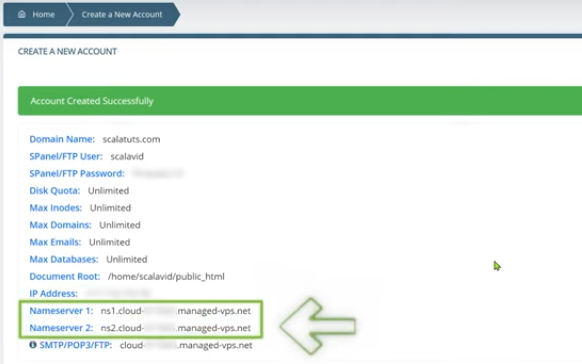
- Obtain The Nameservers From Scalahosting
If you've recently purchased a web hosting plan from Scalahosting, you'll find your nameservers in the welcome email they sent you.
Alternatively, log in to your Scalahosting Client Area and navigate to My Details → Email History to find the welcome email containing your nameserver information.
- Add The Nameservers On Trustname
Once you have your Scalahosting nameservers, you can connect them to your Trustname domain.
[+] [List] Green Ordered - Log In To Your Trustname Account
Visit the Trustname website, click Login in the top right corner, and enter your login credentials.
If you have two factor authentication (2FA) enabled, enter the verification code from your authenticator app to complete the login process.
- Head To Your Domain Settings
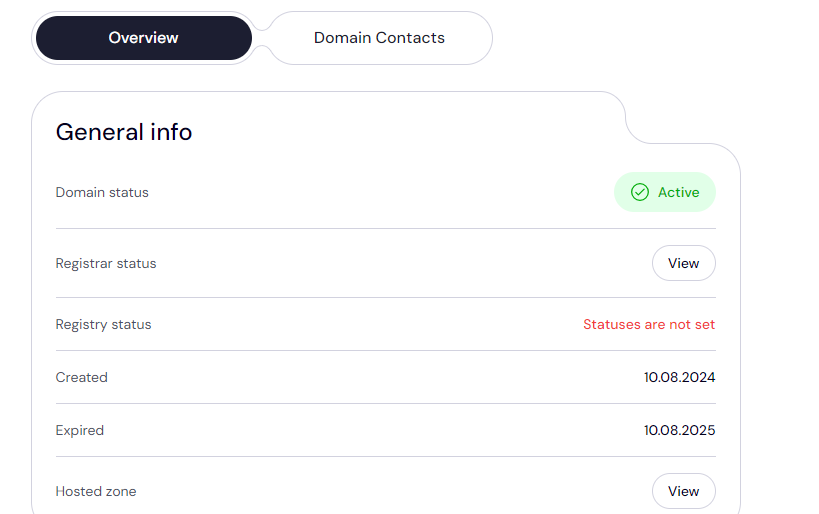
From the main navigation menu, click Domains and select Registered Domains to access your list of domains.
Click the Domain whose nameservers you want to update.

You'll be taken to the domain management page, where you can view your domain settings and contact details.
- Access The Nameserver Settings
Scroll down to the Domain Nameservers section to view your current nameservers. Click on the 'Edit' button to begin configuring your nameservers.
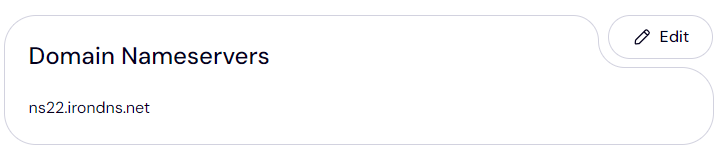
Type in the nameserver addresses you copied from Scalahosting and click 'Save'. That's it!
- Log In To Your Trustname Account
Nameserver Format
Nameservers typically follow a format such as:
- ns1.hostingprovider.com
- ns2.hostingprovider.com
The prefixes ns1 and ns2 represent the primary and secondary nameservers, followed by your hosting provider's domain name.
After updating your nameservers, DNS changes typically take 24 to 48 hours to propagate across the internet.
Confirming The Nameserver Connection
To confirm that your nameserver changes have taken effect.
- Check Your Website
Visit your website in a web browser to ensure it is loading correctly with your Scalahosting hosted content.
- Verify Using WhatsMyDNS
Alternatively, use a public DNS lookup tool such as WhatsMyDNS. Enter your domain name, select NS from the record type dropdown, and verify that your Scalahosting nameservers are resolving globally.
Consolidating Your Domain And Hosting With Trustname
For the simplest website management experience, consider hosting your website with Trustname as well.
Trustname offers domain registration, web hosting, and professional email services, giving you everything you need to launch and manage your website from one place.
Here are the benefits of consolidating your services with Trustname.
- Simplified Management
Manage your domain names, web hosting, and DNS settings from a single, easy to use dashboard.
- Cost Savings
Save time and money by keeping your domain and hosting services together under one provider.
- Automatic Nameserver Setup
Your nameservers are configured automatically when you purchase both your domain and hosting from Trustname.
Get your domain and web hosting from Trustname today for a simpler and more convenient website management experience.
Was this article helpful?
That’s Great!
Thank you for your feedback
Sorry! We couldn't be helpful
Thank you for your feedback
Feedback sent
We appreciate your effort and will try to fix the article