Choosing the right SSL certificate is essential for protecting your website, customer data, and online reputation. This guide explains the different types of SSL certificates, validation levels, their benefits, and how to choose and purchase the right SSL certificate for your website.
Key Takeaways
- Know the Types – Understand Single Domain, Wildcard, and Multi-Domain SSL certificates.
- Choose Wisely – Select the SSL type and validation level that suits your website.
- Stay Secure – SSL protects sensitive data and builds customer trust.
- Boost SEO – Secure websites rank better and avoid browser security warnings.
- Buy Easily – Purchase and install your SSL certificate through Trustname in a few simple steps.
TABLE OF CONTENTS
- Key Takeaways
- What Is An SSL Certificate?
- Types Of SSL Certificates
- What is SSL Validation?
- Certificate Signing Request(CSR)
- Benefits Of Installing An SSL Certificate
- How To Choose The Right SSL Certificate For Your Website?
- Where You Can Buy Your SSL Certificate?
- How To Buy An SSL Certificate On Trustname?
A Single Domain SSL secures one domain, while a Wildcard SSL protects your primary domain and all its subdomains. A Multi-Domain SSL (SAN SSL) secures multiple domains and their subdomains under a single certificate.
Installing an SSL certificate is essential for every website. Without one, sensitive information such as credit card details, addresses, and personal data is vulnerable to cyber threats.
This guide explains the different types of SSL certificates, how to choose the right one for your website, and how to purchase one from Trustname.
What Is An SSL Certificate?
A Secure Sockets Layer (SSL) certificate is a digital certificate that creates an encrypted connection between a web server and a visitor's browser. It protects data transferred between the two, ensuring sensitive information remains private and secure.
SSL certificates also verify your website's identity, helping visitors recognize your site as trustworthy through the padlock icon displayed in the browser's address bar.
Types Of SSL Certificates
- Single Domain SSL
As the name implies, a single domain SSL has been tailored to protect just one domain and its subdirectories. For example, purchasing a single domain certificate for (www.domain1.com) will not secure another domain like (domain2.com) or a subdomain like (news.domain1.com).
If you operate a small business or a blog that doesn't necessarily require collecting sensitive information from customers, a single domain SSL is ideal.
- Wildcard SSL Certificate
A Wildcard SSL secures your primary domain and all of its subdomains.
[+] [Callout] Success Insert title here [+] [Callout] Title/Title with Icon -> A wildcard certificate is a certificate that includes a wildcard character(often an asterisk *) to allow it to be used to protect a domain and its subdomains.
Subdomains are treated as separate websites so wildcard SSLs are incredibly useful since they save you the hassle of buying a new SSL each time you create a subdomain.
Because it covers a larger area than a single domain SSL, it gives you the advantage of adding new subdomains without any hassls. Wildcard certificates offer more value for money as you don't need to purchase separate certificates for each subdomain you own.
For example, if you purchase a wildcard certificate for (www.yourdomain.com), other subdomains like (store.yourdomain.com), and (blog.yourdomain.com) will all be protected under a single wildcard SSL.
Suppose you own a big brand that operates multiple subdomains under the main domain, we recommend getting a wildcard certificate as a cost effective way to get protection for them all.
- Multi-Domain SSL Certificate
[+] [Callout] Success Insert title here [+] [Callout] Title/Title with Icon -> Multiple domain certificates also known as Subject Alternative Name (SAN) certificates are special because they allow you to protect various domains and subdomains with one SSL certificate.
For example, multiple domains like (www.domain1.com), (www.domain2.com), (www.domain3.com) could all be protected by one certificate. Should each of these domains have subdomains under them, they will also be protected by this same certificate. Awesome right?
But before you get any funny ideas for protecting your friend’s domain, the requirement for this to work is if all the domains have the same owner.
Before you're issued the certificate, you must prove that you own it, so there's no cutting corners here.
[+] [Callout] Warning Insert title here [+] [Callout] Title/Title with Icon -> You probably think a multi-domain will be expensive, you're not wrong. So unless you're a big entrepreneur with multiple domains, you’re better off with the wildcard and single domain certificates.
Before you're issued an SSL certificate, the certificate authority needs to ensure that your business is legitimate in a process called SSL validation.
What Is SSL Validation?
Because an SSL certificate legitimizes your business, the certificate authorities must ensure they aren't protecting a website that might potentially harm innocent users.
However, the level of verification required depends on the type of validation you select.
Each SSL certificate comes with three kinds of validations.
- Domain Validation (DV)
This is the easiest type of SSL validation to set up. The certificate authority (CA) only needs to verify and ensure that you who applied for the certificate are the domain owner.
This is usually done via email authentication and the CA will verify from the Whois registrar whether you registered for the certificate or not.
This is best for small businesses and personal websites as it saves time and money.
- Organization Validation (OV)
If you're trying to get validation for a company or organization, the verification process is a bit more strict. An OV certificate displays the domain name, name of the company, and name of the city, state, and country where the company exists.
This warrants a list of requirements you need to verify.
[+] [List] Green Unordered - Authentication Of Organization
- Telephone Verification
- Domain Verification
- Local Presence
- Verification Call
As tedious as this process might seem, it is the only way to distinguish between fake and genuine companies. Organizational validation is best if you own a medium sized business.
- Extended Validation (EV)
This is the highest level of validation an SSL certificate can get. EV certificates instantly make users feel secure, they show a level of trust needed to carry out big and sensitive transactions.
EV certificates can identify phishing sites, stop attacks, and make your website as secure as a bank vault.
This SSL certificate also displays the name and location of your business. However, the certificate authority will require.
[+] [List] Green Unordered - Lawyer’s letter
- Business Authentication
- Telephone Verification
- And Other Documents As Requested.
This is the goto validation large enterprises choose, for them, being trustworthy is paramount. At Trustname, we took our EV certificates a step further by collaborating with DigiCert, the most reputable certificate authority in the world.
Since we're still dissecting SSLs, there's one more important document you need to know about.
Certificate Signing Request(CSR)
Before you get an SSL certificate, one of the first steps you will take is to generate a certificate signing request. This will contain the important bits a certificate authority will use to create your certificate.
However, it must be generated on the same server you plan to install the certificate. It’s like giving specifications for a customized piece of tech you’re buying online.
Now that you have a deeper understanding of the types of SSL certificates, let’s go through a list of the advantages of installing one, in case you need further convincing.
Benefits Of Installing An SSL Certificate
- Protection Of Sensitive Information
SSL certificates give your domain a solid cover from hackers. When you get it installed, you can rest easy knowing that your customers sensitive information will remain protected. As you have noticed, online commerce and transactions rely heavily on SSL certificates.
- Domain And Company Authentication
Because of the verification and validation process you pass through before getting one, SSL certificates serve as a banner of authenticity for your business. Once users see that your website is protected, it gives them the confidence to do business with you.
- Online Visibility
In today’s world, SSL certificates have become mandatory regardless of the size, niche, or type of website you operate. Domains that don't use trusted certificates get flagged by browsers as "not secure". You can imagine the damage such a tag will do to your business.
- Better SEO Rankings
If properly configured, SSL certificates improve your Search engine results. Google has tried to encourage the use of SSLs by giving an SEO boost to websites that are protected.
Almost all browsers today flag and penalize websites without SSLs, making them an indispensable part of SEO and security.
- Prevention Of Phishing Attacks
Although the world has wisened up to phishing attacks, many people are still tricked into divulging sensitive information by these smart hackers.
But as you learned earlier, only the extended validation certificates protect your business against such relentless criminals. Additionally, organizational and extended certificates display your company name in the certificates, this will help your customers spot fake websites and avoid being scammed.
- Improved Conversion Rates
Because of the enhanced security SSLs give. A user will feel more confident buying from you. Imagine trying to buy a product online and your browser notifies you that the website is "not secure". I'm pretty sure you'll close that page faster than the speed of light.
How To Choose The Right SSL Certificate For Your Website?
These are the factors you should consider before settling for an SSL certificate.
- The Purpose Of the website
The different types of SSL certificates were all designed with a specific set of people in mind. If you own a small business or personal blog, the single domain SSL would fit perfectly. Wildcard SSLs are mostly targeted at medium scale businesses that have subdomains under their main domain.
[+] [Callout] Info Insert title here [+] [Callout] Title/Title with Icon -> The multi domain SSL certificate serves large scale enterprises prioritizing top range security and authentication.
- The Level Of Validation Your Website Needs
As we mentioned earlier, each SSL certificate has three different levels of validation essentially the degree to which your website is secure. Domain validation (DV) provides basic protection without strict verification, which is perfect for a small business owner.
But if you own an organization or company, then the organizational validation (OV) should be what you aim for. SSL certificates with this verification carry the name and location of your business, thereby giving it a more legitimate outlook.
[+] [Callout] Success Insert title here [+] [Callout] Title/Title with Icon -> The top of the range is the extended validation (EV), Ev SSLs command more respect and confidence. It is also good at identifying and stopping phishing attacks, giving you fewer things to worry about.
- Your Budget
The amount of money you're willing to spend on an SSL certificate will determine your choice. DV SSL certificates are cheap and easy to get. But you will pay more money climbing the ladder to OV SSLs and EV SSLs.
- The Brand Or Certificate Authority You Want
There are a lot of companies out there that sell SSL certificates, but if you want to avoid funny stories, then look no further than Trustname.
Choosing us will positively impact the warranty amounts, levels of validation, and the seal that will be displayed on your website.
Where You Can Buy Your SSL Certificate?
After learning all the good stuff, you might wonder where to buy the SSL certificate. It's super easy to head to our SSL purchase page to select the best option for your website. But if navigating the page is a bit complicated, here's how you go about it.
How To Buy An SSL Certificate On Trustname?
- Step 1
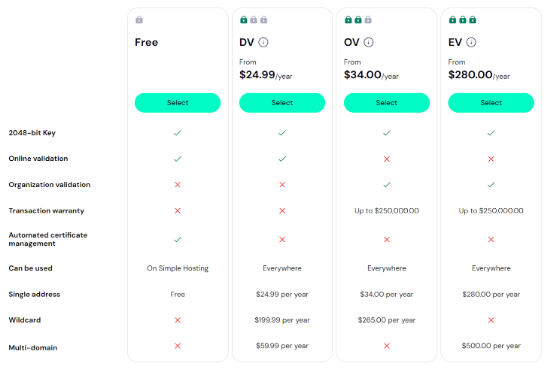
When you open the SSL purchase page, you will see a variety of certificates to choose from. However, you'll need to own a domain name or have access to the domain registrar account. If you don't have one, you can register a new domain here on Trustname.
- Step 2
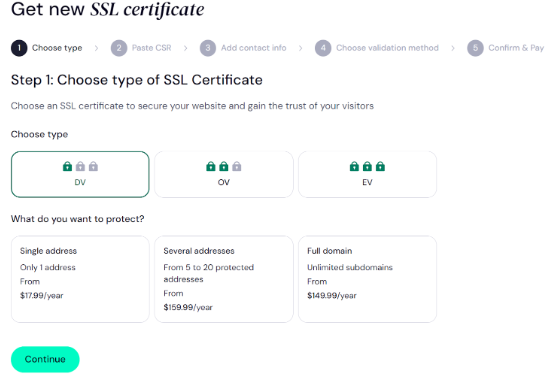
Once you select your preferred choice, the next page will bring up options on how many websites you want to protect. You can choose between single, multiple, or full domains (with subdomains).
- Step 3
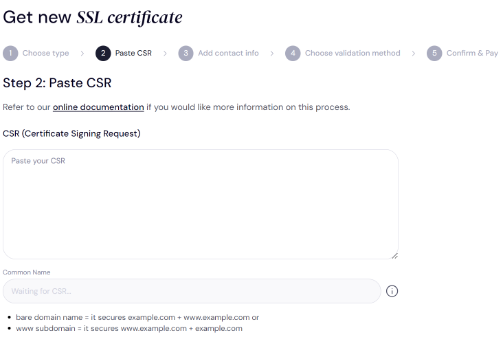
The next step is to paste your certificate signing request (CSR). If you don't have one, you can easily create it from your control panel or a CSR generator tool. To learn more about how to do this, check out these resources.
- Step 4
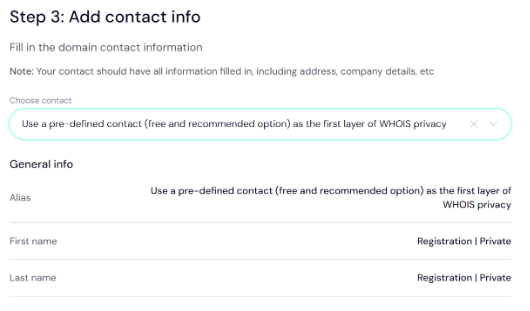
The next step is to add your contact information. You can decide to add a new contact or use a predefined contact that's free and provided by Trustname to ensure your Whois privacy.
- Step 5
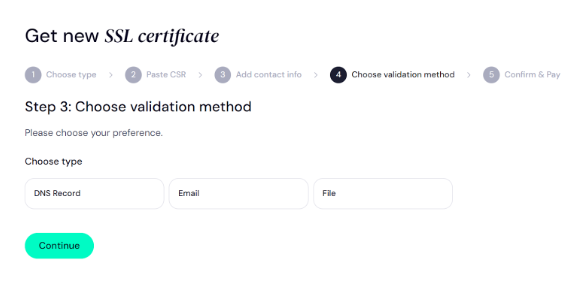
Next, choose how you want to validate your ownership of the domain/identity. If you're buying a DV SSL certificate, you can select Domain, Email, or File verification.
- Step 6
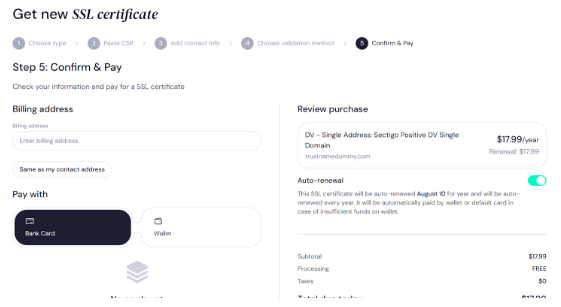
The final step will be to fill in your billing address and payment details to make your purchase. Once you're done typing in the details, review the transaction and click 'Pay'.
Once payment is confirmed, you will receive instructions on where to install the SSL certificate. Thats it!
Was this article helpful?
That’s Great!
Thank you for your feedback
Sorry! We couldn't be helpful
Thank you for your feedback
Feedback sent
We appreciate your effort and will try to fix the article